<?xml version="1.0" encoding="utf-8"?><feed xmlns="http://www.w3.org/2005/Atom" ><generator uri="https://jekyllrb.com/" version="3.10.0">Jekyll</generator><link href="https://www.streamhead.com/feed.xml" rel="self" type="application/atom+xml" /><link href="https://www.streamhead.com/" rel="alternate" type="text/html" /><updated>2026-03-16T19:26:37+01:00</updated><id>https://www.streamhead.com/feed.xml</id><title type="html">Streamhead</title><subtitle>A maker&apos;s journal</subtitle><entry><title type="html">Why I Hardly Blog Anymore</title><link href="https://www.streamhead.com/why-i-hardly-blog-anymore-2025/" rel="alternate" type="text/html" title="Why I Hardly Blog Anymore" /><published>2025-01-03T13:00:00+01:00</published><updated>2025-01-03T13:00:00+01:00</updated><id>https://www.streamhead.com/why-i-hardly-blog-anymore</id><content type="html" xml:base="https://www.streamhead.com/why-i-hardly-blog-anymore-2025/"><![CDATA[<p>As the New Year begins, it feels like the perfect moment to sit down and share what’s been going on. It’s been quite a while since my last post, and I wanted to take a moment to explain why—and to reflect on the past year.</p>

<p>Think of this as a year-in-review post. If you enjoy that kind of thing, you’ll find plenty more of them <a href="https://www.streamhead.com/category/on_streamhead.html">right here</a>.</p>

<!--more-->

<h2 id="the-why">The Why</h2>

<p>Surprisingly, my previous post was written near the end of 2021, about 3 years ago. And the post before that, was 
another one and a half year before that, in 2020. So, why did I stop writing?</p>

<p>The fact is, I didn’t stop writing at all. I am writing in different places. The biggest reason why I did so, is 
because I felt the blog was a bit all over the place. My interests are quite diverse, and I felt that the blog 
became a bit of a mess. Just take a look at all the different things on <a href="https://www.streamhead.com/now/">my now page</a> 
to get the idea.</p>

<p>However, I feel the pendulum has swung too far in the other direction. While all my content may be in the “right” 
location, it’s on many different sites, none of which I control.</p>

<p>So one of my projects in 2025 is going to be to regain control. Although my plan will change for sure, I am going to
crosspost everything to my blog. Even if it is just a copy and paste, I’ll have a backup, and it is in one place.</p>

<p>For now, I am going to ignore the issue of keeping content in sync. I may try to figure out an automated solution
later, but for now, I am going to do it manually.</p>

<h2 id="the-where">The Where</h2>

<p>The first part of this, is figuring out where all my content is. I started to make a list, but I have a feeling I
will come back to it later to add other things.</p>

<h3 id="active-side-projects">Active Side Projects</h3>

<p>Right now, I have two pretty active side projects going on:</p>

<h4 id="the-lego-sorter">The LEGO Sorter</h4>

<p>You can read the announcement on this blog <a href="https://www.streamhead.com/3d%20printing/ai/2021/11/01/deep-learning-lego-sorting.html">here</a>.
Over the years I have worked on it from time to time, and quite a bit the last few months.
Most of this work can be seen on <a href="https://github.com/pbackx/lego-sorter-pi/">Github</a>,
but I also run <a href="https://subscribepage.io/sorting-updates">a monthly newsletter about it</a>. Sadly, there’s no easy way to
access the archives, but I am working on that.</p>

<h4 id="savvy-folders">Savvy Folders</h4>

<p>I started <a href="https://www.savvyfolders.com/">this project</a> in late 2024 because I had some extra time. It’s the very example of scratching my own itch.
For now, I am the only and very happy user of it, but I’ve recently been making progress into making it public.</p>

<p><a href="https://www.indiehackers.com/product/savvy-folders">My progress is on Indie Hackers</a>.</p>

<h3 id="social-media">Social Media</h3>

<p>My usage of social media is limited, or so I thought. Here are the sites where I am still active.</p>

<h4 id="goodreads">Goodreads</h4>

<p>Each year, I set myself a challenge of reading at least 12 books. Most of the time, I read more, sometimes I read things
I don’t always consider “books” (technical books, comics, etc.).</p>

<p><a href="https://www.goodreads.com/user/show/37577599-peter-backx">I keep track of everything with short reviews on Goodreads</a>.</p>

<h4 id="how-long-to-beat">How Long to Beat</h4>

<p>A guilty pleasure of mine is playing video games. I’ve been playing them for years, and I still both the old and many
of the new games.</p>

<p>I keep track of my progress on <a href="https://howlongtobeat.com/user/peterfromm/">How Long to Beat</a>. I also try to write a
review on the games I finish, but I don’t finish that many games.</p>

<h4 id="mastodon">Mastodon</h4>

<p>Finally, there is <a href="https://indiehackers.social/@peterb">my Mastoodon account</a>. I am a pretty passive user of it, but 
some periods, I manage to post regularly.</p>

<h2 id="the-next-thing">The Next Thing</h2>

<p>I think the above covers the major places where I am actively creating content. There’s a few other places that I want
to back up, but I’ll get to that later (eg. Twitter).</p>

<p>The next step is going to be to define categories and import the existing content. I am not really looking forward to 
this, which is why I am publicly committing to it. I hope that will give me the push I need to get it done and to get
this blog relevant again.</p>]]></content><author><name>Peter Backx</name></author><category term="On Streamhead" /><summary type="html"><![CDATA[As the New Year begins, it feels like the perfect moment to sit down and share what’s been going on. It’s been quite a while since my last post, and I wanted to take a moment to explain why—and to reflect on the past year.]]></summary></entry><entry><title type="html">Deep Learning Lego Sorter</title><link href="https://www.streamhead.com/3d%20printing/ai/2021/11/01/deep-learning-lego-sorting.html" rel="alternate" type="text/html" title="Deep Learning Lego Sorter" /><published>2021-11-01T17:00:00+01:00</published><updated>2021-11-01T17:00:00+01:00</updated><id>https://www.streamhead.com/3d%20printing/ai/2021/11/01/deep-learning-lego-sorting</id><content type="html" xml:base="https://www.streamhead.com/3d%20printing/ai/2021/11/01/deep-learning-lego-sorting.html"><![CDATA[<p>My latest project is all about artificial intelligence and robotics. 
Probably every father dreams of not having to sort his children’s (or his own) Lego bricks to find that 
one brick that is needed to complete the model. 
Since I love both robotics and AI, I had to combine the two.</p>

<!--more-->

<h2 id="introduction">Introduction</h2>

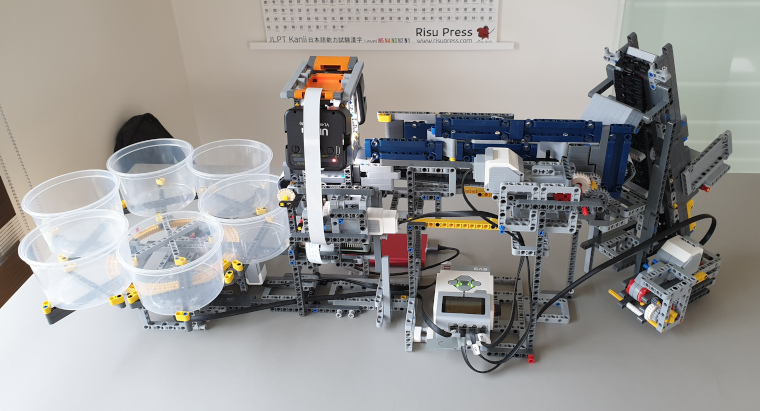
<p><img src="https://www.streamhead.com/assets/img/lego_sorter/lego_sorter_overview.jpg" alt="My Lego sorter" /></p>

<p>From my previous endeavors in robotics, I had learned that it’s not easy to get motors to do exactly
what you want them to do. So this time, I choose to use pure Lego to make my Lego sorter. Since Lego
released their new Mindstorms kit, the previous one (EV3) can be bought second hand fairly cheaply.</p>

<p>The only non Lego parts I use are a Raspberry Pi and the latest HQ camera and some generic LED lights. 
Some custom designed and 3D printed parts make sure that everything fits nicely together.</p>

<p>On the software side, I use OpenCV, Keras, Tensorflow and the usual Python data wrangling suspects to create 
a deep learning model to categorize the Lego bricks.</p>

<p>My current setup is only trained to recognize 3 types of bricks, but it does so with very high accuracy
(+95%) even though the model is very basic. Obviously, the next step is to extend it and push different 
types of bricks through the system.</p>

<h2 id="the-hardware">The hardware</h2>

<p>Lego EV3 is pure quality. The motors and sensors are very reliable and with 
<a href="https://www.ev3dev.org/">some help of the community</a> you can do just about anything with them. If
you weren’t convinced that Lego are quality toys, you should get one of these. A lot of little 
problems that you would run into are fixed by their system. No need for motor drivers, encoders, 
battery management, etc.</p>

<p>It just works.</p>

<p>What does not “just work” is a solution to put one brick at a time in front of the camera.
I got a lot of inspiration from others that have built similar systems, but the end result is most definitely
very much mine.</p>

<p>The entire thing is built from one big Technic’s set, <a href="https://www.bricklink.com/v2/catalog/catalogitem.page?S=42055-1">the 42055, aka the Bucket Wheel Excavator</a>.
It’s a huge set and a very good one if you can still find it at a reasonable price. <a href="https://brickset.com/article/23024/42055-b-model-mobile-aggregate-grader">The B model is 
also a great built</a>.</p>

<p>The only other Lego items are four EV3 motors (2 large, 2 medium), one light sensor and the big EV3 brick.
I also had to buy some additional long EV3 cables, because the machine is fairly big.</p>

<h3 id="brick-size">Brick size</h3>

<p>One important remark: To keep things manageable, I’m only sorting bricks up to about 1 cubic cm. Lego bricks 
have a huge variety in size which makes this problem even more difficult. So I have 
<a href="https://www.thingiverse.com/make:857956">3D printed a sieve</a> that I use to filter out the large bricks and
only retain the smaller ones.</p>

<h3 id="the-feeder">The feeder</h3>

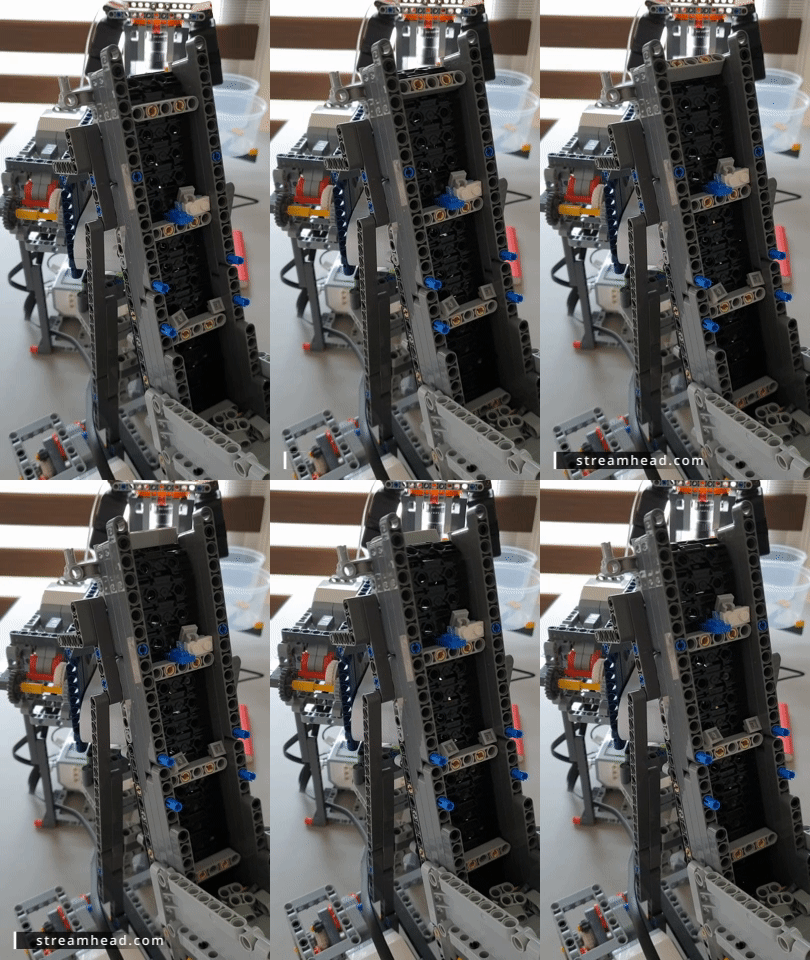
<p><img src="https://www.streamhead.com/assets/img/lego_sorter/lego_sorter_feeder1.gif" alt="Going up" /></p>

<p>If you search the Internet for sorters, you’ll find they all use a similar setup: A feeder 
system arranges the bricks so it can feed one brick at a time to an image recognition system. 
Next, there is a system that deposits the brick into the correct bin.</p>

<p>The feeder is the most difficult part. I’m still tweaking it constantly. I’ve rebuilt
most parts a few times. I will probably rebuild them a few more times.</p>

<p>Even though it’s now pretty reliable, it still manages to push two blocks at a time in front of the camera 
or a brick does get stuck from time to time.</p>

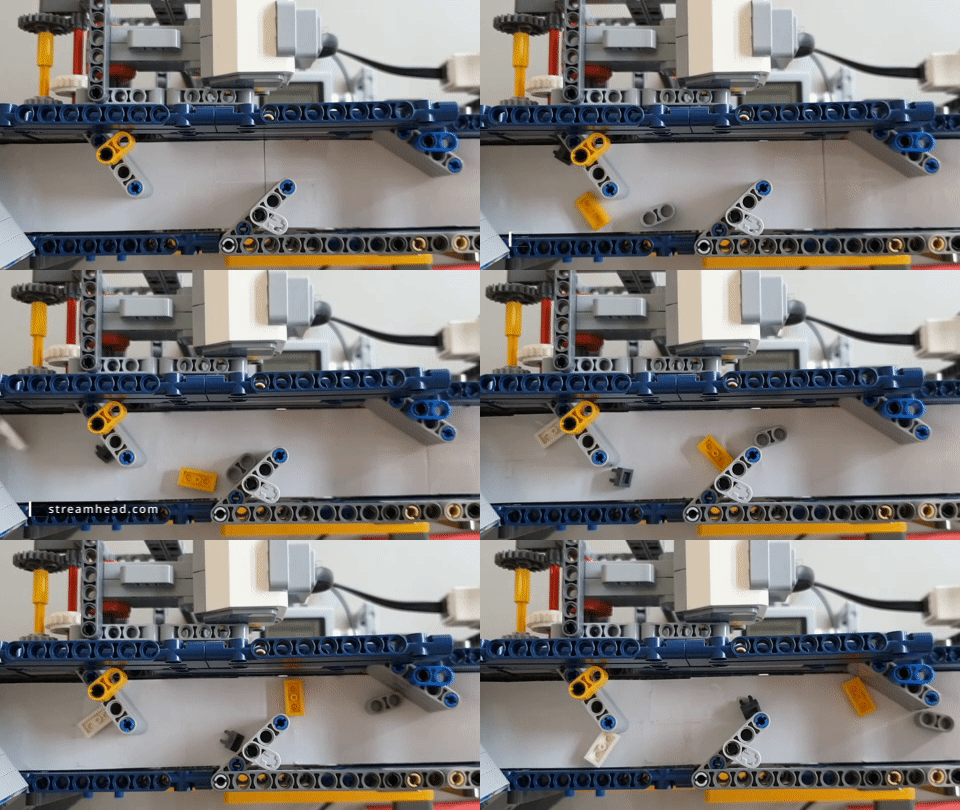
<p><img src="https://www.streamhead.com/assets/img/lego_sorter/lego_sorter_feeder2.gif" alt="One by one" /></p>

<p>The system consists of two belts. One that takes the bricks up from the initial bin and the second one that
has well-placed panels to make sure the bricks exit the feeder one at a time. The idea is that every successive
belt is faster than the previous one so the bricks will get separated at they go through the system. I have
considered adding a third belt, but that would drastically increase the size of the machine. I may try it in
a future iteration by building belts on top of each other.</p>

<p>All belts, except the first one are wrapped in a thin layer of paper. The Lego bricks slide over the paper, which
is an essential part of the feeder system. The panels make the bricks slide into one line of individual pieces.</p>

<h3 id="the-recognition">The recognition</h3>

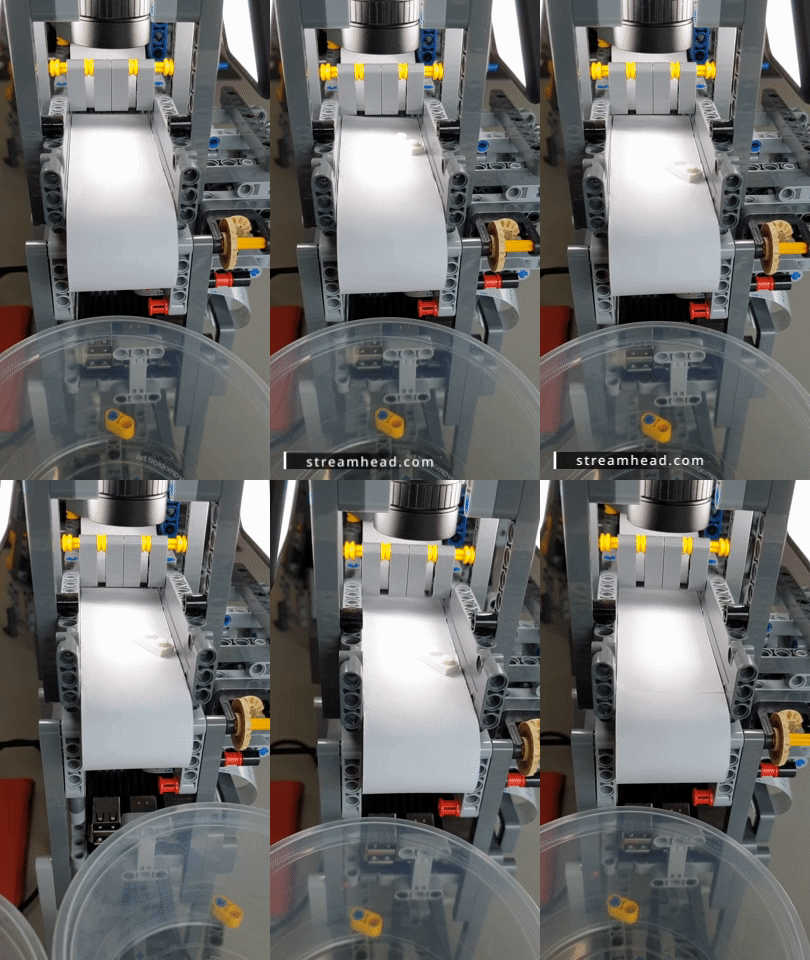
<p>The Raspberry Pi and its high quality camera continuously monitor the belt underneath. If it detects motion, it
stops the feeder and will try to position the brick in the middle of the image. I have added two LED flashlights 
that make sure the brick is evenly lit, even when the sun does not want to cooperate.</p>

<p>When the brick is positioned underneath the camera, it snaps a picture and sends this to the recognition neural
network.</p>

<p>I designed and printed some parts so that I could mount the camera and flashlights to the Technic parts. <a href="https://www.thingiverse.com/thing:4965928">The
parts are available on Thingiverse should you want to try to reproduce my 
results</a>.</p>

<p><img src="https://www.streamhead.com/assets/img/lego_sorter/lego_sorter_recognition.gif" alt="Camera capture" /></p>

<h3 id="actual-sorting">Actual sorting</h3>

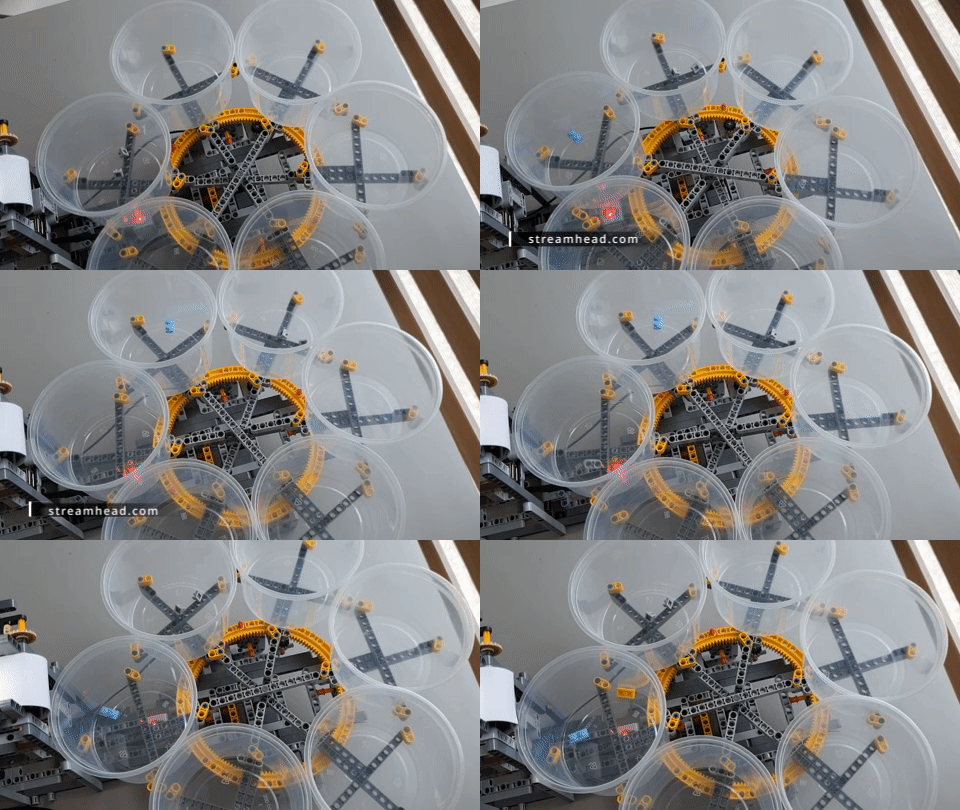
<p>Once the brick type is known, the hard work is done. The final stage of the sorting machine consists of six
buckets.</p>

<p>The buckets are mounted to a spinning wheel. Underneath the wheel is a Mindstorms color sensor. This
sensor senses when a bucket is above it and will make sure the bucket is properly aligned.</p>

<p><img src="https://www.streamhead.com/assets/img/lego_sorter/lego_sorter_output.gif" alt="Buckets" /></p>

<h2 id="the-software">The software</h2>

<p><a href="https://github.com/pbackx/lego-sorter-pi">All software and links to inspiration can be found on GitHub</a>. 
I’ve gotten a lot of good ideas from Kaggle. Things that were not clear, I could find in the great documentation 
for Keras and Tensorflow.</p>

<p>Most of the software runs inside Jupyter notebook. Notebooks are annoying to version control, but 
it’s absolutely the ideal way to quickly experiment and try out new ideas.</p>

<h3 id="motion-detection">Motion detection</h3>

<p>Motion detection is using OpenCV. It took some experimentation to get it to work inside a
Jupyter notebook, but eventually it worked. It is now fairly reliable at detecting movement,
even if it’s a white Lego brick on the white belt.</p>

<h3 id="deep-learning">Deep learning</h3>

<p>My deep learning model is based on VGG16 with some extra layers for transfer learning. I’ve 
also experimented with fine-tuning, but for my limited dataset, it has not (yet) been very
useful. I expect that will change when more photos are added.</p>

<p><a href="https://github.com/pbackx/lego-sorter-pi/tree/main/data/labeled">The labeled data is also part of the Github project.</a>
I currently do the labeling by hand, by dragging the images into the proper folder. I’m also
keeping some reference images of the belt without a brick. I’m not using these right now, but
they may come in handy if I want to do more pre-processing in the future.</p>

<p>The deep learning part of the software runs on my desktop PC and the Raspberry Pi accesses it
via a basic Rest API (built using Flask). I could probably run the inference on the Pi, but
for now, I have kept the training and inference on the same machine.</p>

<h2 id="conclusion">Conclusion</h2>

<p>While there’s still a lot to be improved. I’m very happy with how far I got. It demonstrates how far
technology has come. We live in a great time when a single guy can build this kind of machines at home.
And it was great fun!</p>

<p>PS: <a href="https://rebrickable.com/mocs/MOC-90902/pbackx/automated-lego-sorting-machine/">if you want to build the exact machine, I have created the plans in Bricklink’s Studio and you can
find them on Rebrickable</a></p>]]></content><author><name>Peter Backx</name></author><category term="3D Printing" /><category term="AI" /><summary type="html"><![CDATA[My latest project is all about artificial intelligence and robotics. Probably every father dreams of not having to sort his children’s (or his own) Lego bricks to find that one brick that is needed to complete the model. Since I love both robotics and AI, I had to combine the two.]]></summary></entry><entry><title type="html">Robots and Puzzles</title><link href="https://www.streamhead.com/3d%20printing/ai/robotics/2020/05/07/robots-and-puzzles.html" rel="alternate" type="text/html" title="Robots and Puzzles" /><published>2020-05-07T00:00:00+02:00</published><updated>2020-05-07T00:00:00+02:00</updated><id>https://www.streamhead.com/3d%20printing/ai/robotics/2020/05/07/robots-and-puzzles</id><content type="html" xml:base="https://www.streamhead.com/3d%20printing/ai/robotics/2020/05/07/robots-and-puzzles.html"><![CDATA[<p>My mind tends to wander from one project to the next. Which means, most of my projects are fairly small and I tend to forget about posting them here. I’ve recently been trying to show them off on YouTube using short videos. Here are two I posted in the last month: A home-built robot connected to AWS RoboMaker and SageMaker and a simple storage solution for a wooden puzzle.</p>

<!--more-->

<h2 id="robots">Robots</h2>

<p>I’ve long been fascinated by robots. I’ve built a few smaller ones and from time to time come back to them to improve them or try something new.</p>

<p>When <a href="https://awsmarketplaceml.devpost.com/">devpost was holding an AI challenge</a>, it was time to rebuilt the robot one more time.</p>

<iframe width="560" height="315" src="https://www.youtube.com/embed/mj5foOQ_A78" frameborder="0" allow="accelerometer; autoplay; encrypted-media; gyroscope; picture-in-picture" allowfullscreen=""></iframe>

<p>Links to get you started:</p>

<ul>
  <li><a href="https://www.robotshop.com/">Robotshop</a> has a nice selection of robot-related materials. Another option I use regularly is AliExpress.</li>
  <li><a href="https://ros.org/">ROS</a> is somewhat of a standard in the robot world. It can run on a Raspberry Pi and is quite easy to get into. However, it feels like the community is getting split by the release of ROS2.</li>
  <li>Conveniently, it’s also what <a href="https://aws.amazon.com/robomaker/">AWS RoboMaker</a> uses (ROS 1, not 2)</li>
  <li>RoboMaker has “native” support for a number of robots, so if you want to buy a pre-built one, the <a href="https://www.turtlebot.com/">TurtleBot3</a> seems to be a good choice. It’s quite expensive, but, as I expand my own robot, I’m starting to realize, it’s not overpriced.</li>
</ul>

<h2 id="3d-printing">3D Printing</h2>

<p>Initially I was using my 3D printer to print all kinds of junk that was fun to show of and next it would end up in the trashcan (<em>cough</em> fidget spinners <em>cough</em>).</p>

<p>I’m now mostly using it for things I actually need and can use. You’ll notice the robot above has a 3D printed camera holder (not designed by me BTW).</p>

<p>Learning to design 3D objects is probably the best thing you can do if you have a 3D printer. It allows you to quickly test out a solution for even the smallest problem you have, such as this one:</p>

<iframe width="560" height="315" src="https://www.youtube.com/embed/M4Un45q9V7Y" frameborder="0" allow="accelerometer; autoplay; encrypted-media; gyroscope; picture-in-picture" allowfullscreen=""></iframe>

<p>Some links if you want to know more:</p>

<ul>
  <li><a href="https://www.autodesk.com/products/fusion-360/overview">Fusion 360</a> is one of the better design packages out there for things like this. I’m not happy about the license, which is sort-of free, but could change any day. The only somewhat feasible open source alternatives I have found are <a href="https://www.openscad.org/">OpenSCAD</a> for small parametrized designs or <a href="https://www.blender.org/">Blender</a> which comes with a huge learning curve and which I don’t particularly like for technical designs.</li>
  <li>I’m still happy with my <a href="https://ultimaker.com/">Ultimaker 3</a> printer, but looking at the other options out there right now (for instance, the Prusa printers), it’s probably not the best one for small hobbyist makers at this time.</li>
  <li>If you want these kinds of puzzles, there’s really only one source out there: <a href="https://www.puzzlemaster.ca/">Puzzle Master</a> (sadly in Canada, which makes shipping to Belgium very expensive)</li>
</ul>]]></content><author><name>Peter Backx</name></author><category term="3D Printing" /><category term="AI" /><category term="Robotics" /><summary type="html"><![CDATA[My mind tends to wander from one project to the next. Which means, most of my projects are fairly small and I tend to forget about posting them here. I’ve recently been trying to show them off on YouTube using short videos. Here are two I posted in the last month: A home-built robot connected to AWS RoboMaker and SageMaker and a simple storage solution for a wooden puzzle.]]></summary></entry><entry><title type="html">3D Printing with ColorFabb varioShore TPU Filament</title><link href="https://www.streamhead.com/3d%20printing/2020/03/29/printing-with-colorfabb-varioshore.html" rel="alternate" type="text/html" title="3D Printing with ColorFabb varioShore TPU Filament" /><published>2020-03-29T00:00:00+01:00</published><updated>2020-03-29T00:00:00+01:00</updated><id>https://www.streamhead.com/3d%20printing/2020/03/29/printing-with-colorfabb-varioshore</id><content type="html" xml:base="https://www.streamhead.com/3d%20printing/2020/03/29/printing-with-colorfabb-varioshore.html"><![CDATA[<p>I’ve been running a number of experiments to get some experience with <a href="https://colorfabb.com/varioshore-tpu-black">ColorFabb’s new varioShore filament</a>. This is a TPU filament, so it’s flexible, but the really interesting part is that it will expand when printed. How much it expands depends on the printing temperature.</p>

<!--more-->

<h2 id="printing-tpu-on-the-ultimaker-3">Printing TPU on the Ultimaker 3</h2>

<p>I have an Ultimaker3 printer that uses <a href="https://www.fabbaloo.com/blog/2015/11/11/bowden-or-direct-a-primer-on-extruder-styles">a Bowden setup</a>. Printing flexible materials, including this TPU materials such as varioShore can be tricky on bowden printers because the filament can tangle at various places in the feeder system.</p>

<p>The Ultimaker has a pretty good setup with very few places where the filament can bunch up, but it still happens.</p>

<p>When printing at lower temperatures, the feeder has to push the filament harder through the extruder. If it has to push too hard, the filament will tangle inside the feeder assembly. This of course ruins the print and is a mess to clean up.</p>

<p>This can also happen on direct drive extruders, but a lot less, because a direct drive does not have to push against the additional friction of the bowden tube.</p>

<p>In practice, this meant that I was not able to reliably print below about 210°C. But as you’ll read below, that didn’t matter too much.</p>

<h2 id="varioshore-variable-expansion">varioShore Variable Expansion</h2>

<p><a href="https://colorfabb.com/varioshore-tpu-black">The varioShore box and site</a> explain that the filament will not expand if you print between 190 and 200 degrees. If you increase the temperature it will start expanding.</p>

<p>I did a number of <a href="https://www.thingiverse.com/thing:2939551">testprints</a> to figure out what the right temperature was for my printer:</p>

<ul>
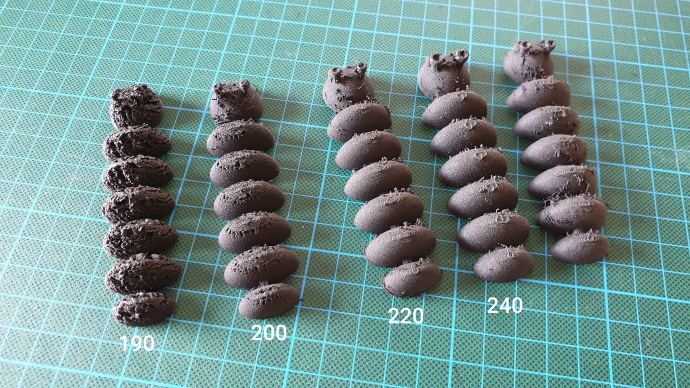
  <li>Up to about 210 degrees, there was little to no expansion.</li>
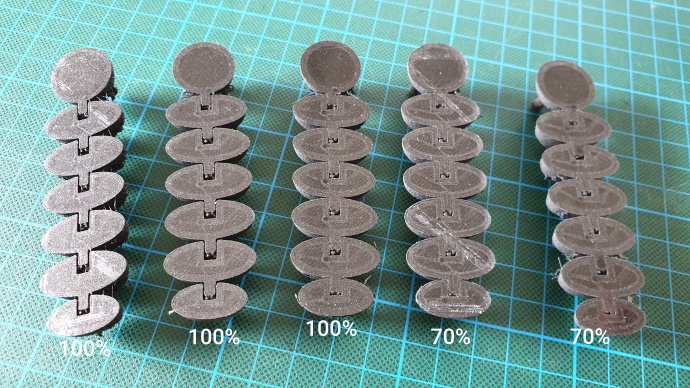
  <li>Anything higher and the magic started to happen. I did not see much difference between temperatures. 230 and 240 both required flow rates of about 60% (pictures show 70% but that’s too much)</li>
</ul>

<p>You can see the difference quite clearly in the following picture. The rightmost prints only had a 70% flowrate, but still the joints fused together:</p>

<p><img src="https://www.streamhead.com/assets/img/varioshore/ColorFabb_varioShore_infill_comparison.jpg" alt="infill comparison" /></p>

<p>For reference, here’s the temperatures that they were printed at. Notice the issues I had printing at lower temperatures:</p>

<p><img src="https://www.streamhead.com/assets/img/varioshore/ColorFabb_varioShore_temperature.jpg" alt="printing temperatures" /></p>

<p>When I got those measurements down, I noticed something strange. I was expecting that the “expanded” prints would be more flexible than the “non-expanded” ones. But this turns out to be incorrect.</p>

<h2 id="infill">Infill</h2>

<p>The reason why is the infill. I used the same infill (20%) for all prints. However, when the material expanded, this meant there was actually more infill. Which in turn meant it was less flexible.</p>

<p>So the secret to playing around with the flexibility of prints is not the printing temperature (which is hard to change dynamically anyway) but it is the amount of infill.</p>

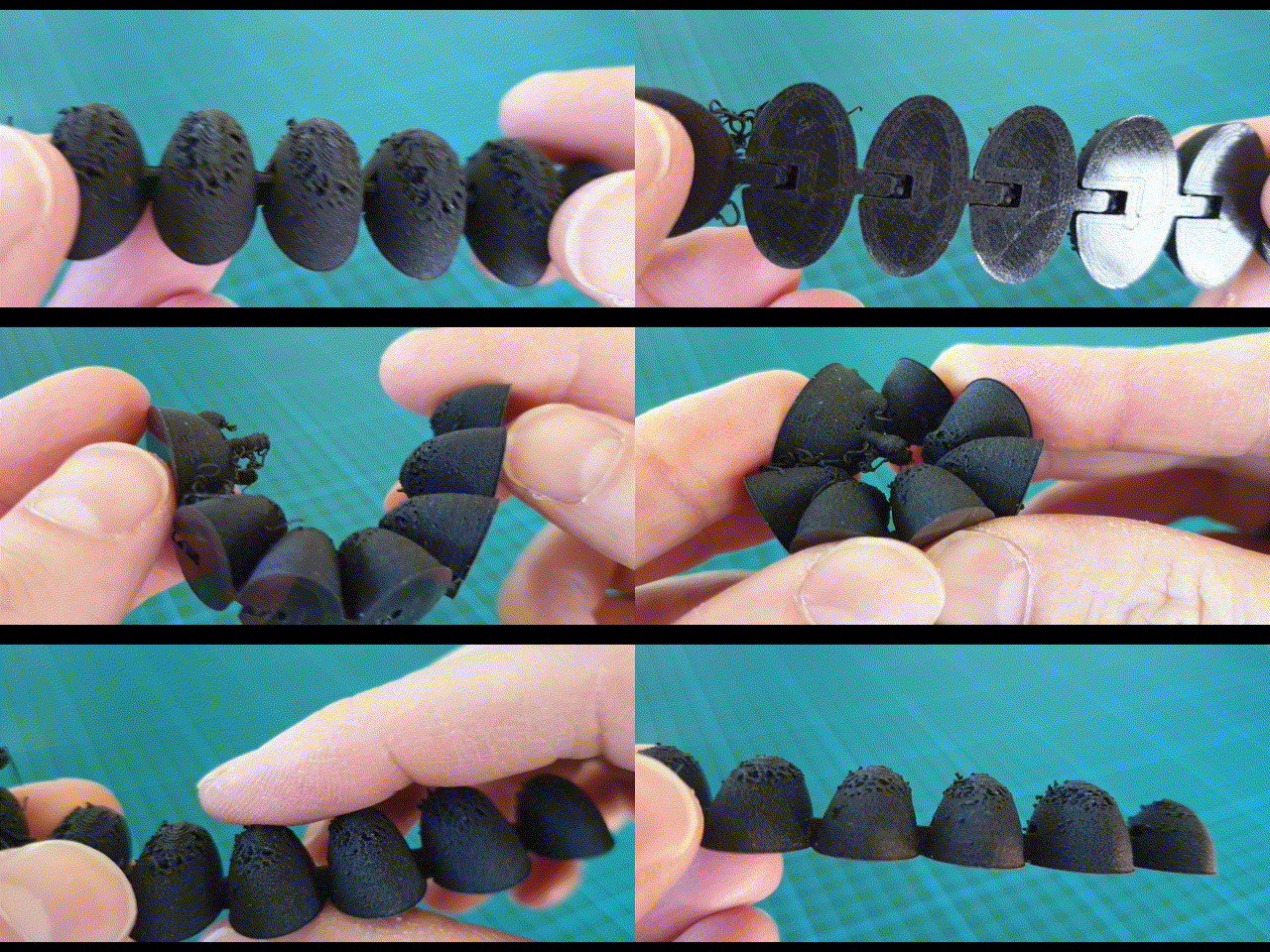
<p>At 200 degrees and 20% infill there was a under-extrusion at the top (see above) and the end result was also extremely flexible:</p>

<p><img src="https://www.streamhead.com/assets/img/varioshore/200_degrees_20_infill.gif" alt="200 degrees and 20%infill" /></p>

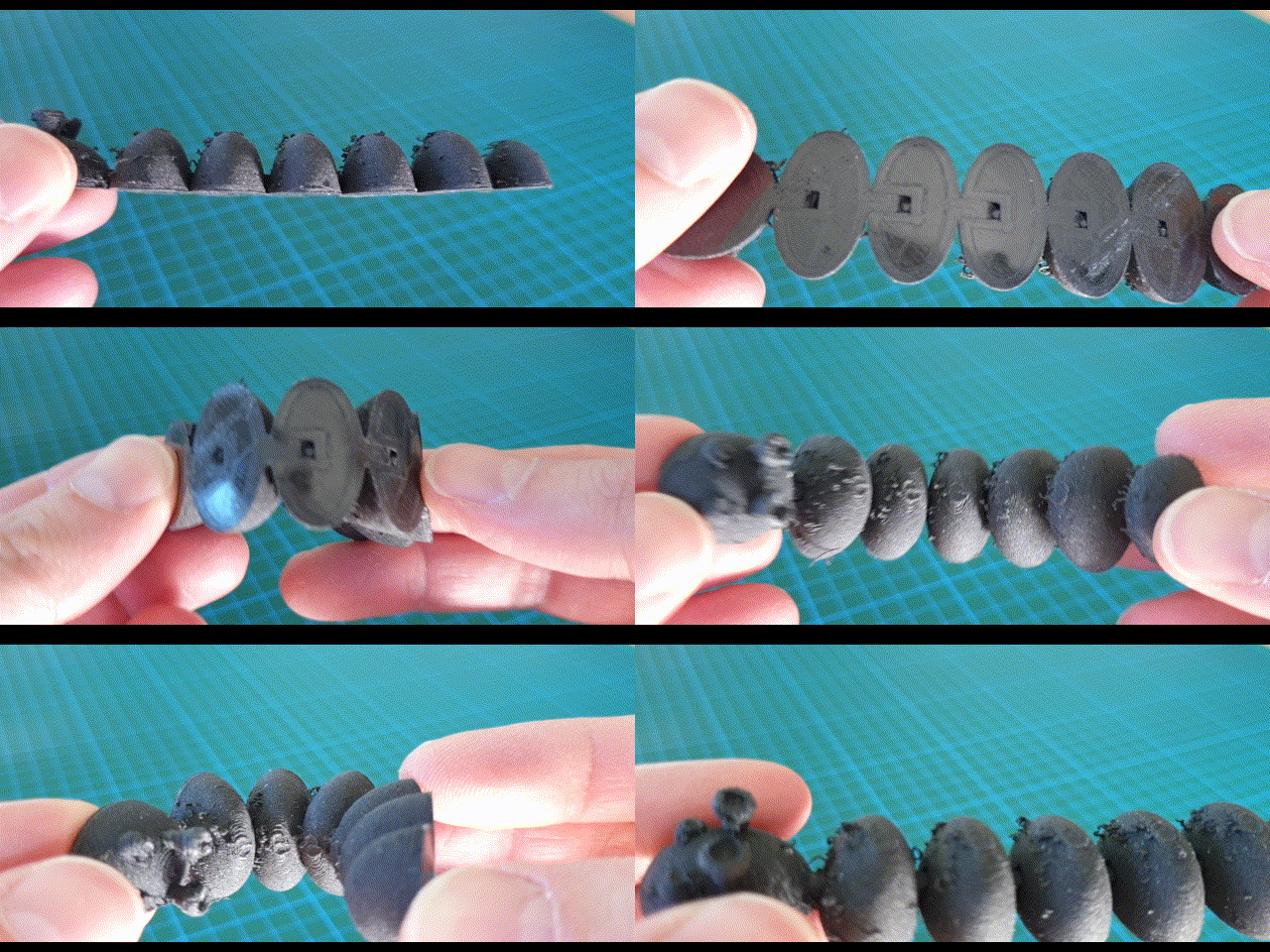
<p>At 240 degrees, again with 20% infill, the result was a lot stiffer. Also notice the stringing, which is inherent to TPU and Bowden. It can be cleaned up quite easily with a small knife or a bit of sanding:</p>

<p><img src="https://www.streamhead.com/assets/img/varioshore/240_degrees_20_infill.gif" alt="240 degrees and 20% infill" /></p>

<p>I did a final test print that had a number of the segments at 20% infill and others at 5%. The difference was easy to feel, but hard to show in a picture.</p>

<p><a href="https://ultimaker.com/en/resources/52004-adjustment-tools">In Cura, you can vary the infill by adding a simple object such as a square and using the “per model settings” to change the infill in certain areas</a>. Note that the Cura manual is not entirely up-to-date with the latest Cura, but it’s close enough.</p>

<h2 id="conclusion">Conclusion</h2>

<p>ColorFabb’s varioShore is not the easiest material to print with. It required testing and experimenting before I was able to finetune the printing parameters and get the results I wanted.</p>

<p>But once I got that done, I was really happy with the material. It’s very versatile, extremely light and strong.</p>

<p>One thing I did not mention yet, is the feel of the material, it has a slight rough feeling and is completely different than the PLA or PETG prints that I am used to.</p>]]></content><author><name>Peter Backx</name></author><category term="3D Printing" /><summary type="html"><![CDATA[I’ve been running a number of experiments to get some experience with ColorFabb’s new varioShore filament. This is a TPU filament, so it’s flexible, but the really interesting part is that it will expand when printed. How much it expands depends on the printing temperature.]]></summary></entry><entry><title type="html">3D Printed Water Rocketry</title><link href="https://www.streamhead.com/3d%20printing/2019/10/11/3d-printed-water-rocketry.html" rel="alternate" type="text/html" title="3D Printed Water Rocketry" /><published>2019-10-11T00:00:00+02:00</published><updated>2019-10-11T00:00:00+02:00</updated><id>https://www.streamhead.com/3d%20printing/2019/10/11/3d-printed-water-rocketry</id><content type="html" xml:base="https://www.streamhead.com/3d%20printing/2019/10/11/3d-printed-water-rocketry.html"><![CDATA[<p>Since my last post, quite some time ago, I have been studying up on designing objects for 3D printing. I created some custom hooks that made my wife happy. I fixed my son’s broken toys. And most recently, I adapted an existing water rocket design to fit the parts I had lying around. Great fun ensued.</p>

<!--more-->

<h2 id="designing-for-3d-printing">Designing for 3D Printing</h2>

<p>When I first got my 3D printer, I went through a phase of printing all kinds of random stuff from Thingiverse. For a short while, I even ran a small business selling 3D printed trinkets. I guess it’s a rite of passage for any one with a 3D printer.</p>

<p>However, I grew pretty tired of that fairly fast. When I started designing my own objects things really got interesting.</p>

<p>If you want to get started with designing your own objects for 3D printing, I have two suggestions:</p>

<ul>
  <li>For mechanical parts, I really love <a href="https://www.openscad.org/">OpenSCAD</a>. There’s a pretty steep learning, but it’s worth learning. It will especially appeal to developers.</li>
  <li>For everything else, there’s only one choice and it’s <a href="https://www.autodesk.com/products/fusion-360/overview">Fusion360</a>. I tried many other tools, but this one is the perfect balance between a good price (free for most, pretty affordable for every one else) and extremely rich functionality. It’s parametric design is OpenSCAD on steroids and the amount of tutorials available on YouTube is staggering.</li>
</ul>

<h2 id="water-rockets">Water Rockets</h2>

<p>A <a href="https://en.wikipedia.org/wiki/Water_rocket">water rocket</a> is, in essence, a plastic bottle under pressure. Water is pushed out to drive the rocket into the air.</p>

<p>Technically, it’s a really simple system, however, the devil is in the details. If you search the Internet and Thingiverse, you’ll find a lot of designs. Some of which look downright dangerous (you are playing with a pressurized vessel, so some caution is needed) and others simply don’t hold up to the forces.</p>

<p>After some searching around, I decided to go for <a href="http://www.raketfuedrockets.com/en/index.htm">the Raketfued design</a>. It’s simple, it’s modular, it looks capable from their videos and it uses many existing components that you can buy of the shelve.</p>

<h2 id="the-parts">The Parts</h2>

<p>Water rockets are fairly easy, generally speaking, you need:</p>

<ul>
  <li>An actual rocket that will contain water and pressurized air.</li>
  <li>Some way to put air pressure in the rocket.</li>
  <li>A launchpad to hold the rocket in place before it is launched.</li>
</ul>

<h3 id="the-rocket">The Rocket</h3>

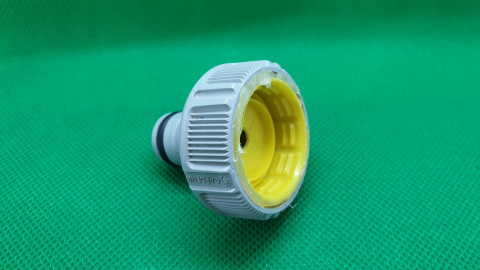
<p>The rocket is easy enough. Just find an empty soda bottle. However, a good nozzle is more complicated than you may think. It’s the part that you use to put pressure into the bottle and through that same part water will exit at great force to push the rocket forward.</p>

<p><img src="https://www.streamhead.com/assets/img/water_rocket/water_rocket_nozzle.jpg" alt="The nozzle" /></p>

<p>Initially, I tried to print the nozzle on the Raketfued website. After some initial disappointment, I would advice every one to just buy a Gardena tap connector (the large version) and glue in a soda bottle cap.</p>

<p>It just works and with the right glue, it’s much more reliable than anything you may be able to print. I used a 2 component glue that nicely filled all the cracks and crevices and is super strong.</p>

<p>You can also add a nosecone and wings to your rocket. Don’t make it too fancy at first. I forgot to take pictures before we started launching and there’s not much left to take pictures of.</p>

<h3 id="pressure-hose">Pressure Hose</h3>

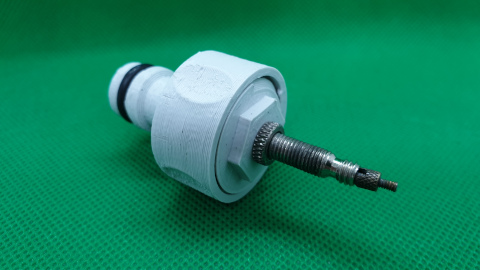
<p>Next, you will need to pressurize the rocket. The brilliance of the Raketfued system is that is uses standard Gardena hoses and connectors. You may have most of what you need already lying around in your garden shed.</p>

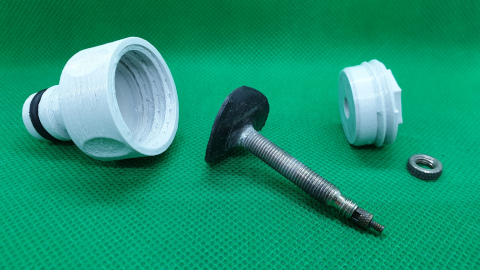
<p>Raketfued uses a car tire valve which I don’t have, but I did have a bike valve and bicycle tire pump. So I designed a small screw-in connector piece to use that one. I needed a few tries, but the result works perfectly. Both parts are printed. First the <a href="http://www.raketfuedrockets.com/en/3dprinting.htm#xl_nozzles">the Raketfued Gardena to screwcap connector</a> and second <a href="https://www.thingiverse.com/thing:3904980">my own screw-in plug</a>.</p>

<p><img src="https://www.streamhead.com/assets/img/water_rocket/water_rocket_valve.jpg" alt="The bicycle valve" /></p>

<p><img src="https://www.streamhead.com/assets/img/water_rocket/water_rocket_valve_disassembled.jpg" alt="The valve parts" /></p>

<h3 id="the-launchpad">The Launchpad</h3>

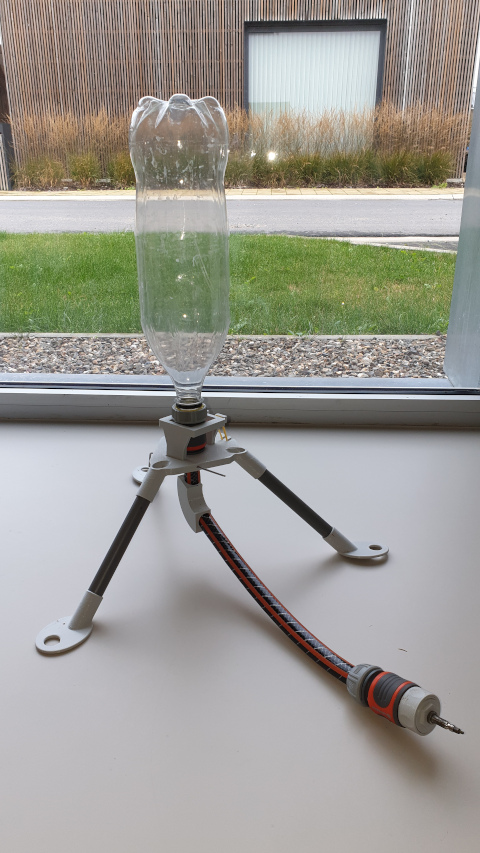
<p>The final part is something to hold your rocket in place until the launch.</p>

<p><img src="https://www.streamhead.com/assets/img/water_rocket/water_rocket_completed.jpg" alt="The rocket" /></p>

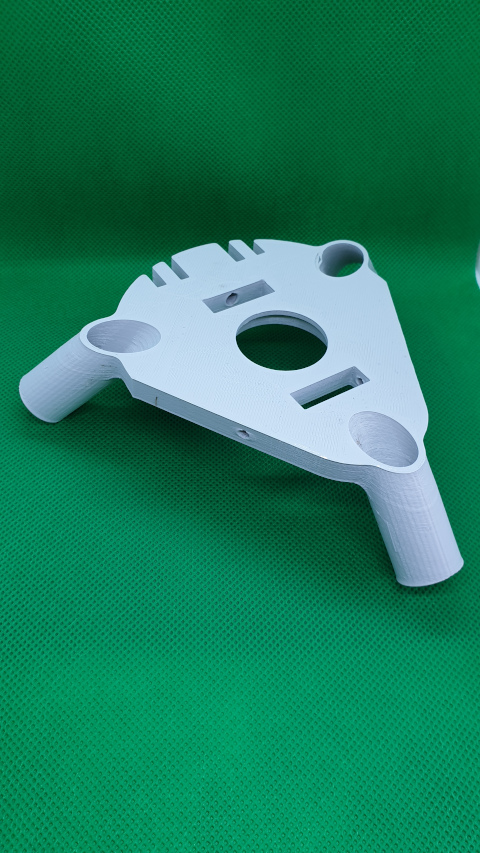
<p>I took <a href="http://www.raketfuedrockets.com/en/3dprinting.htm#xl_PodPad">the PodPad</a> and adapted it to what I had in my garage:</p>

<ul>
  <li>Smaller holes to fit a 16mm PVC pipe for the frame.</li>
  <li>Larger holes in the feet because I didn’t have tent pegs, but I do have larger pegs to hold the net in place that protects our raspberries from hungry birds.</li>
</ul>

<p><img src="https://www.streamhead.com/assets/img/water_rocket/water_rocket_launchpad.jpg" alt="Base of the launchpad" /></p>

<p><a href="https://www.thingiverse.com/thing:3904980">All modified parts are available on Thingiverse</a>.</p>

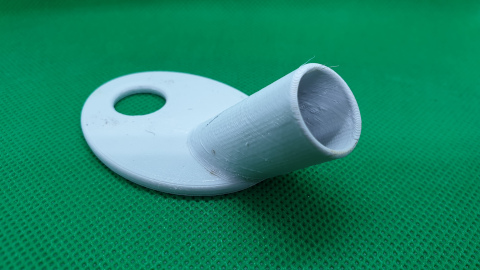
<p><img src="https://www.streamhead.com/assets/img/water_rocket/water_rocket_feet.jpg" alt="Need 3 of those feet" /></p>

<p>I did not change anything about the actual mechanic. This launchpad works flawlessly and it shows that simple designs are usually the best.</p>

<h2 id="conclusion">Conclusion</h2>

<p>When everything was designed and printed, it was time to head outside. It took some trial and error to get the amount of water and pressure right, but we had a number of good flights before the rocket started to disintegrate.</p>

<p>We lost the wings first, which severely impacted the flight path. Things got much more exciting and we had to duck a few times (keep your distance!)</p>

<p>Overall it was an incredible amount of fun and a great family activity.</p>

<p>Give it a try next summer.</p>

<p>You can find everything you need on <a href="http://www.raketfuedrockets.com/en/3dprinting.htm#">Raketfuedrockets.com</a> and my parts on <a href="https://www.thingiverse.com/thing:3904980">Thingiverse</a>.</p>]]></content><author><name>Peter Backx</name></author><category term="3D Printing" /><summary type="html"><![CDATA[Since my last post, quite some time ago, I have been studying up on designing objects for 3D printing. I created some custom hooks that made my wife happy. I fixed my son’s broken toys. And most recently, I adapted an existing water rocket design to fit the parts I had lying around. Great fun ensued.]]></summary></entry><entry><title type="html">3D Printers and Air Quality</title><link href="https://www.streamhead.com/3d-printers-air-quality/" rel="alternate" type="text/html" title="3D Printers and Air Quality" /><published>2018-06-12T00:24:08+02:00</published><updated>2018-06-12T00:24:08+02:00</updated><id>https://www.streamhead.com/3d-printers-air-quality</id><content type="html" xml:base="https://www.streamhead.com/3d-printers-air-quality/"><![CDATA[<p>So lets talk about 3D printers and their fumes. I’ve been heavily into 3D printing for about 2 and a half years, first building a Prusa i3 clone and later buying an Ultimaker 3. One of the things that has always bothered me was the possibility of toxic fumes. About 2 years ago, <a href="https://hackaday.com/2016/02/01/3d-printing-fumes-new-science/">a study came to light</a> that, yes, indeed, 3D printers do emit things that aren’t good for you. There was a lot of discussion about it around that time, but it seems to have died down.</p>

<!--more-->

<p><strong>Disclaimer</strong>: Before we continue, I must first confess I do not possess the right credentials to perform any kind of proper scientific study into air quality. Consider me a concerned citizen and if you do have the proper background, please get in touch, I’d love to cooperate to get to the bottom of this.</p>

<p><a href="https://www.betterthanpants.com/i-am-not-an-expert-but-i-have-watched-a-lot-of-youtube-videos-funny-t-shirt#!"><img class="aligncenter size-medium wp-image-4143" src="http://www.streamhead.com/wp-content/uploads/2018/06/i-am-not-an-expert-but-i-have-watched-a-lot-of-youtube-videos-funny-tshirt-large-300x300.png" alt="" width="300" height="300" srcset="http://www.streamhead.com/wp-content/uploads/2018/06/i-am-not-an-expert-but-i-have-watched-a-lot-of-youtube-videos-funny-tshirt-large-300x300.png 300w, http://www.streamhead.com/wp-content/uploads/2018/06/i-am-not-an-expert-but-i-have-watched-a-lot-of-youtube-videos-funny-tshirt-large.png 500w" sizes="(max-width: 300px) 100vw, 300px" /></a></p>

<h2 id="introduction">Introduction</h2>

<p>You can <a href="https://pubs.acs.org/doi/full/10.1021/acs.est.5b04983">read the full study here</a> and a number of follow-up experiments <a href="http://built-envi.com/portfolio/ultrafine-particle-emissions-from-3d-printers/">on the dedicated page of the Built Environment Research Group</a>, which has performed the studies.</p>

<p>To summarize it very briefly, they found that all filaments emit ultra fine particles (UFP, in the range of 10 nano meter (nm) to 0.1 micro meter) and volatile organic compounds (VOCs, one of those, styrene is very likely carcinogenic, while others are currently uncertain but suspect)</p>

<p>Most amounts exhausted are most likely of no great concern. For instance, the <a href="https://en.wikipedia.org/wiki/Ultrafine_particle">UFP</a>s were in the range of other indoor activities, such as cooking. So as long as you are in a ventilated place, you should be fine. However, some precautions never hurt any one.</p>

<p>The styrene that was emitted by ABS is worrisome. And if you print a lot with ABS, you should probably make sure you somehow extract the fumes or are not in the same room for too long. Other <a href="https://en.wikipedia.org/wiki/Volatile_organic_compound">VOC</a>s are harmless, while still others, we just don’t know, so it’s better to safe than sorry.</p>

<p><a href="https://en.wikipedia.org/wiki/Styrene#/media/File:Styrene-from-xtal-2001-3D-balls.png"><img class="aligncenter size-medium wp-image-4142" src="http://www.streamhead.com/wp-content/uploads/2018/06/Styrene-from-xtal-2001-3D-balls-300x230.png" alt="" width="300" height="230" srcset="http://www.streamhead.com/wp-content/uploads/2018/06/Styrene-from-xtal-2001-3D-balls-300x230.png 300w, http://www.streamhead.com/wp-content/uploads/2018/06/Styrene-from-xtal-2001-3D-balls-768x588.png 768w, http://www.streamhead.com/wp-content/uploads/2018/06/Styrene-from-xtal-2001-3D-balls-1024x784.png 1024w" sizes="(max-width: 300px) 100vw, 300px" /></a></p>

<h2 id="measuring-ufps">Measuring UFPs</h2>

<p>If you want to measure ultrafine particles at home, you’re going to have to shell out some serious cash. I was not able to locate equipment that was affordable or did not have a “call us” button instead of a price.</p>

<p>The best I could do (and I know, this is very unscientific) is a PM2.5 sensor. These devices measure particles from about 100 nm up to 2.5 micro m. So they are not perfect, but at least they measure the higher range of the UFP sizes.</p>

<p><a href="https://www.aliexpress.com/wholesale?catId=0&amp;initiative_id=SB_20180601110841&amp;SearchText=pm2.5">PM2.5 sensors are so abundantly and cheaply available on AliExpress, I very much wonder how reliable they are</a>.</p>

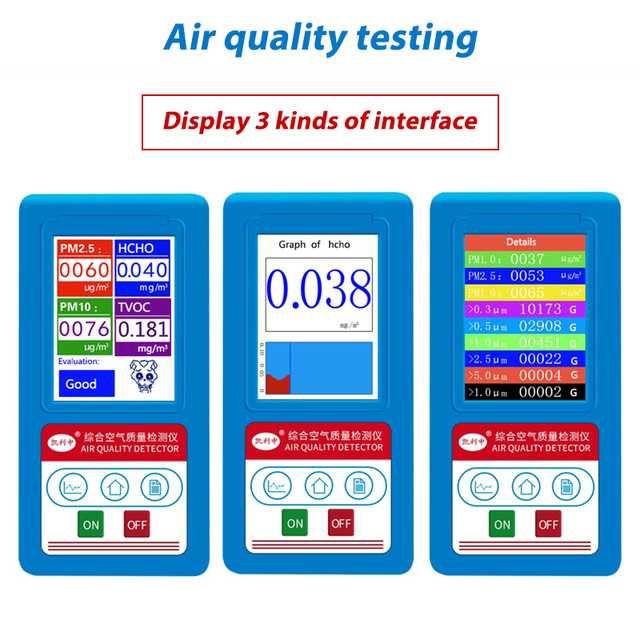
<p><a href="https://www.aliexpress.com/item/Air-Quality-Monitor-Mini-Laser-PM2-5-Monitor-Wall-mounted-Inovafitness-PM2-5-Detector-Gas-monitor/32826759103.html?spm=2114.search0104.3.1.6ab51369HoMndG&amp;ws_ab_test=searchweb0_0,searchweb201602_2_10152_5722917_10151_10065_10344_10068_10342_10325_10343_5722817_10546_10340_10548_10341_5722617_10696_10084_10083_10618_10304_10307_5722717_10059_100031_10103_5722517_10624_10623_10622_10621_10620,searchweb201603_25,ppcSwitch_5&amp;algo_expid=a1c00b5b-6afb-4346-99aa-e6dd2f781454-0&amp;algo_pvid=a1c00b5b-6afb-4346-99aa-e6dd2f781454&amp;priceBeautifyAB=0">I ordered one anyway</a>. (As a side-note, my main criteria was that it actually had to look real. There are a lot of things on AliExpress that look like concept art. I have no idea what you’ll get when you order one of those)<figure id="attachment_4141" style="width: 300px" class="wp-caption aligncenter"></figure></p>

<p><a href="http://www.streamhead.com/wp-content/uploads/2018/06/Formaldeyde-HCHO-PM1-0-PM2-5-PM10-Gas-Analyzer-TVOC-Particles-Detector-Meter-PM-2-5.jpg_640x640.jpg"><img class="size-medium wp-image-4141" src="http://www.streamhead.com/wp-content/uploads/2018/06/Formaldeyde-HCHO-PM1-0-PM2-5-PM10-Gas-Analyzer-TVOC-Particles-Detector-Meter-PM-2-5.jpg_640x640-300x300.jpg" alt="" width="300" height="300" srcset="http://www.streamhead.com/wp-content/uploads/2018/06/Formaldeyde-HCHO-PM1-0-PM2-5-PM10-Gas-Analyzer-TVOC-Particles-Detector-Meter-PM-2-5.jpg_640x640-300x300.jpg 300w, http://www.streamhead.com/wp-content/uploads/2018/06/Formaldeyde-HCHO-PM1-0-PM2-5-PM10-Gas-Analyzer-TVOC-Particles-Detector-Meter-PM-2-5.jpg_640x640.jpg 640w" sizes="(max-width: 300px) 100vw, 300px" /></a>&lt;figcaption class="wp-caption-text"&gt;Seriously, there’s no way the real thing even remotely looks like this. I almost ordered it to see what would actually be delivered.&lt;/figcaption&gt;&lt;/figure&gt;</p>

<p>I doubt a $45 device is properly calibrated, but at least, it should give an idea of relative values, or how much <em>more</em> particles there are in the air while printing. So don’t spend too much time looking at the absolute numbers, focus on the relatives.</p>

<p>The main downside of those devices is that you are not able to get their readings and store them permanently, so it’s impossible to log the values over longer time.</p>

<p>As a baseline, I’ve done measurements on random days in my office. The office is connected to a home ventilation system, so it continuously gets fresh and filtered air. Obviously, these initial measurements were taken when the printer had not printed for at least 12 hours. The readings varied <strong>between about 5 and 15 micrograms/m³</strong>. The higher reading was on a hot, sunny day that had no wind.</p>

<p>When I went outside on that day, it was even worse:</p>

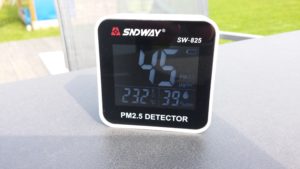
<p><img class="aligncenter size-medium wp-image-4138" src="http://www.streamhead.com/wp-content/uploads/2018/06/20180414_114032-300x169.jpg" alt="" width="300" height="169" srcset="http://www.streamhead.com/wp-content/uploads/2018/06/20180414_114032-300x169.jpg 300w, http://www.streamhead.com/wp-content/uploads/2018/06/20180414_114032-768x432.jpg 768w, http://www.streamhead.com/wp-content/uploads/2018/06/20180414_114032-1024x576.jpg 1024w" sizes="(max-width: 300px) 100vw, 300px" /></p>

<p>So if you’re scared for particles, better to stay indoors when it’s hot outside.</p>

<p>With the printer working (printing <strong>PLA</strong> and a bit of PVA), I consistently saw an increase. Usually around 5 microg/m³.</p>

<p><img class="aligncenter size-medium wp-image-4139" src="http://www.streamhead.com/wp-content/uploads/2018/06/20180414_093816-300x169.jpg" alt="" width="300" height="169" srcset="http://www.streamhead.com/wp-content/uploads/2018/06/20180414_093816-300x169.jpg 300w, http://www.streamhead.com/wp-content/uploads/2018/06/20180414_093816-768x432.jpg 768w, http://www.streamhead.com/wp-content/uploads/2018/06/20180414_093816-1024x576.jpg 1024w" sizes="(max-width: 300px) 100vw, 300px" /></p>

<p>I got similar results on different days with different weather conditions. Almost always, the number of particles outside was more than inside while the printer was active, but there was a slight increase of particles inside the office.</p>

<p>So it looks like this kind of pollution is in line with the original paper. I would not want to hang around in a room where multiple printers are constantly printing, but a hobby printer that’s on from time to time seems to be ok.</p>

<p>And if you’re still worried (you should be!), there’s an easy precaution you can take to alleviate the potential risk. But first, lets take a look at VOCs.</p>

<h2 id="measuring-vocs">Measuring VOCs</h2>

<p>Similar to the UFPs, I was not able to find a device that can measure specific types of VOCs for any reasonable price. So I took another road. If you want to thinker, there are many boards available that allow you to measure the total amount of VOCs.</p>

<p>I bought <a href="https://www.adafruit.com/product/3709">this Adafruit SGP30 board</a> and combined it with <a href="https://www.aliexpress.com/w/wholesale-esp32-oled.html?spm=2114.search0104.1.1.12a91c52f1YO9O&amp;SearchText=esp32+oled&amp;initiative_id=RS_20180601123824">a Wemos Lolin clone</a> I had lying around.</p>

<p>Again very similar to the UFP measurement devices, I very much doubt I was able to properly calibrate it, but I did follow the guide (leave if running for 12 hours and store the baseline every hour). So again, the relative values should be ok to interpret.</p>

<p><em>Note: I hope to write an entire post about this setup and open source the code in the near future. There’s just one more thing I want to add to the code before I consider it sort-of done 😉</em><figure id="attachment_4144" style="width: 300px" class="wp-caption aligncenter"></figure></p>

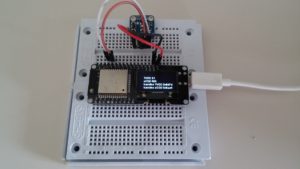
<p><img class="size-medium wp-image-4144" src="http://www.streamhead.com/wp-content/uploads/2018/06/20180512_095542-300x169.jpg" alt="" width="300" height="169" srcset="http://www.streamhead.com/wp-content/uploads/2018/06/20180512_095542-300x169.jpg 300w, http://www.streamhead.com/wp-content/uploads/2018/06/20180512_095542-768x432.jpg 768w, http://www.streamhead.com/wp-content/uploads/2018/06/20180512_095542-1024x576.jpg 1024w" sizes="(max-width: 300px) 100vw, 300px" />&lt;figcaption class="wp-caption-text"&gt;My setup: output is directly displayed on the screen. I’m working on an extension to log the measurements and run experiments over longer time windows.&lt;/figcaption&gt;&lt;/figure&gt;</p>

<p>Measurements of the total VOCs varied widely. Anything between 5 and 200 parts per billion (ppb) (again, hot and sunny days seem to be worse). Even within an hour, there were large 50+ variations.</p>

<p>When printing, I was not able to see a rise in the numbers. At least nothing that seemed out of the normal variations I had seen.</p>

<p>Even when I tried printing ABS, I was not able to see a meaningful increase in the numbers. Since the Ultimaker is an open printer, I’m guessing the particles were mixed into the air and concentration became too low to measure. If you dissolve 50 microgram/minute into the volume of my office (about 40m³) and combine it with the constant inflow of fresh air, I can imagine it’s hard to measure something in parts per billion.</p>

<p>I plan to add an enclosure to my printer combined with a fan that sucks the printers air and redirects it to the sensor. That should give better measurements.</p>

<p>So the jury is still out on this one.</p>

<p><img class="aligncenter size-medium wp-image-4145" src="http://www.streamhead.com/wp-content/uploads/2018/06/futurecontinued-300x168.jpg" alt="" width="300" height="168" srcset="http://www.streamhead.com/wp-content/uploads/2018/06/futurecontinued-300x168.jpg 300w, http://www.streamhead.com/wp-content/uploads/2018/06/futurecontinued.jpg 570w" sizes="(max-width: 300px) 100vw, 300px" /></p>

<h2 id="filtering-ufps-and-vocs">Filtering UFPs and VOCs</h2>

<p>The next thing one wants to do, is of course get rid of these things.</p>

<p><a href="https://en.wikipedia.org/wiki/HEPA">HEPA filters</a> can help with filtering UFPs. <a href="https://ehs.mit.edu/site/biosafety/biosafety-cabinets#HEPA">Although they work better with slightly larger particles, they are also somewhat effective for smaller sizes</a>. Given that the UFP concentration is already around fairly normal values, this is good enough for me. For now at least.</p>

<p>VOCs can be filtered by <a href="https://en.wikipedia.org/wiki/Activated_carbon">activated carbon or charcoal</a>. You’ll usually find these as granules or as foam impregnated with powder.</p>

<p>Both of these items are dirt cheap, so, of course, I built a filter.</p>

<p><a href="https://www.thingiverse.com/thing:2105113">Thingiverse has multiple designs, but I chose to build this one</a>. Mostly because it has room for both an activated carbon filter and a HEPA filter. Furthermore, it’ uses off-the-shelf parts that you can source from AliExpress or other places easily and it has a large fan, which means it doesn’t make as much noise as some of those small fans.</p>

<p>The design is not perfect, but it’s ok. I was not able to use the grill that should go on the HEPA filter. It needs tiny but very long screws and it’s not needed anyway. I think It’s also quite easy to redesign so it doesn’t need as much plastic by not completely encasing the fan. <a href="https://www.thingiverse.com/thing:1831932">Something along those lines</a>. You’re probably only going to print this once, so it’s not that important.</p>

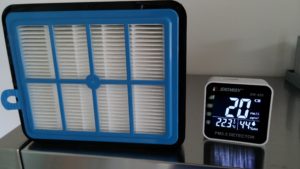
<p>So how does it work? Actually really good for particles. As before, the baseline with the fan turned off was around 20 microg/m³:</p>

<p><img class="aligncenter size-medium wp-image-4146" src="http://www.streamhead.com/wp-content/uploads/2018/06/20180414_093527-300x169.jpg" alt="" width="300" height="169" srcset="http://www.streamhead.com/wp-content/uploads/2018/06/20180414_093527-300x169.jpg 300w, http://www.streamhead.com/wp-content/uploads/2018/06/20180414_093527-768x432.jpg 768w, http://www.streamhead.com/wp-content/uploads/2018/06/20180414_093527-1024x576.jpg 1024w" sizes="(max-width: 300px) 100vw, 300px" /></p>

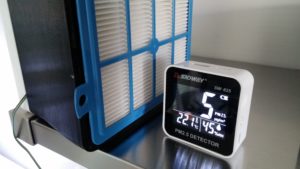
<p>With fan on the exhaust has much cleaner air:</p>

<p><img class="aligncenter size-medium wp-image-4147" src="http://www.streamhead.com/wp-content/uploads/2018/06/20180414_084126-300x169.jpg" alt="" width="300" height="169" srcset="http://www.streamhead.com/wp-content/uploads/2018/06/20180414_084126-300x169.jpg 300w, http://www.streamhead.com/wp-content/uploads/2018/06/20180414_084126-768x432.jpg 768w, http://www.streamhead.com/wp-content/uploads/2018/06/20180414_084126-1024x576.jpg 1024w" sizes="(max-width: 300px) 100vw, 300px" /></p>

<p>That’s the good news.</p>

<p>As for TVOC measurements: I saw very little difference between intake and exhaust ppb readings. I’m a bit suspicious of the activated carbon foam. I’m not sure I bought the good stuff. And I also need to figure out my measuring techniques by doing longer time measurements. So again, I’m not sure what to think of this and more work is needed.</p>

<h2 id="conclusion">Conclusion</h2>

<p>While the measured VOCs and UFPs when printing PLA was small and does not present an immediate danger, it’s a very good idea to be vigilant. Regularly, scientific studies appear that link a number of health issues with these pollutants.</p>

<p>So I would suggest every one who is 3D printing to at least make sure the room is ventilated, drawing in fresh air. If possible, add an air filter. You can build one very cheap, so it is a no-brainer.</p>

<p>Finally, you can put your printer in an enclosure. It’s something I plan to do, just to err on the safe side.</p>

<p>If I didn’t make myself clear at the start: I know barely enough to be dangerous and much more study is required. In general, I’m saddened that only few people and companies are investigating this further. Most prefer to ignore it. If you want to help out. Please get in touch (use Facebook or Twitter, the contact form is a spam trap and not very regularly checked).</p>

<!-- AddThis Advanced Settings generic via filter on the_content -->

<!-- AddThis Share Buttons generic via filter on the_content -->]]></content><author><name>Peter Backx</name></author><category term="3D Printing" /><summary type="html"><![CDATA[So lets talk about 3D printers and their fumes. I’ve been heavily into 3D printing for about 2 and a half years, first building a Prusa i3 clone and later buying an Ultimaker 3. One of the things that has always bothered me was the possibility of toxic fumes. About 2 years ago, a study came to light that, yes, indeed, 3D printers do emit things that aren’t good for you. There was a lot of discussion about it around that time, but it seems to have died down.]]></summary></entry><entry><title type="html">Recording the Ultimaker 3 Webcam</title><link href="https://www.streamhead.com/recording-ultimaker-3-webcam/" rel="alternate" type="text/html" title="Recording the Ultimaker 3 Webcam" /><published>2017-11-13T19:43:26+01:00</published><updated>2017-11-13T19:43:26+01:00</updated><id>https://www.streamhead.com/recording-ultimaker-3-webcam</id><content type="html" xml:base="https://www.streamhead.com/recording-ultimaker-3-webcam/"><![CDATA[<p>So you’ve got this awesome Ultimaker 3 printer with a build-in webcam. But no way to record and review your prints later on. Are you going to sit around, babysitting your printer at night?</p>

<!--more-->

<p>Well, no, you don’t have to! The webcam broadcasts a video that you can watch (and record) from anywhere in your network.</p>

<p>There are two steps to recording your video:</p>

<ul>
  <li>Find the IP address of your printer. It’s three clicks in the printer’s menu.</li>
  <li>Record the broadcast using your preferred software. Tip: VLC works on almost any platform and is free.</li>
</ul>

<h2 id="find-the-ip-address">Find the IP address</h2>

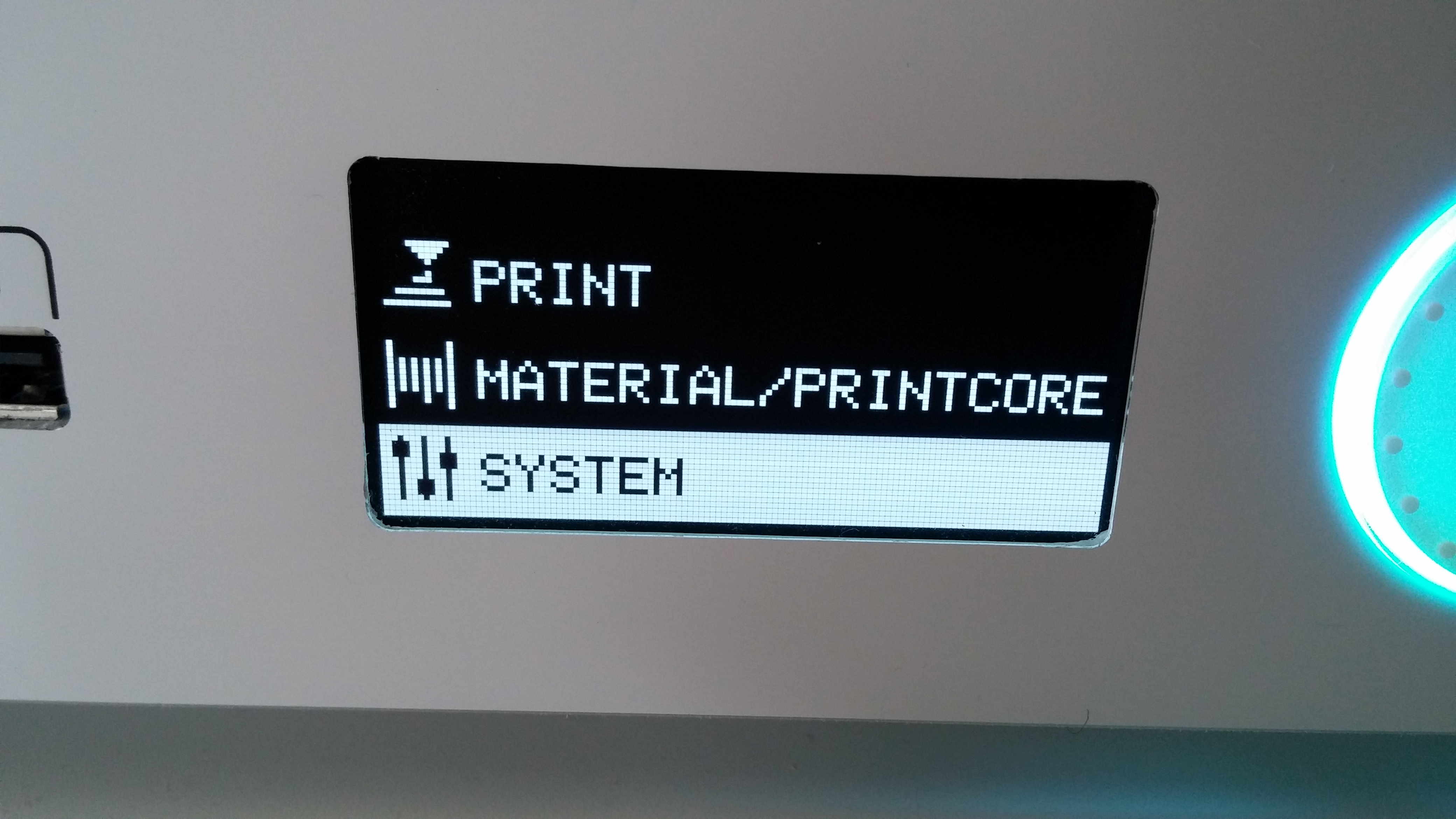
<p>When your printer is powered on, pick “System” from the root menu:<figure id="attachment_4113" style="width: 300px" class="wp-caption aligncenter"></figure></p>

<p><a href="http://www.streamhead.com/wp-content/uploads/2017/11/UM3_main_menu.jpg"><img class="size-medium wp-image-4113" src="http://www.streamhead.com/wp-content/uploads/2017/11/UM3_main_menu-300x169.jpg" alt="" width="300" height="169" srcset="http://www.streamhead.com/wp-content/uploads/2017/11/UM3_main_menu-300x169.jpg 300w, http://www.streamhead.com/wp-content/uploads/2017/11/UM3_main_menu-768x432.jpg 768w, http://www.streamhead.com/wp-content/uploads/2017/11/UM3_main_menu-1024x576.jpg 1024w" sizes="(max-width: 300px) 100vw, 300px" /></a>&lt;figcaption class="wp-caption-text"&gt;Ultimaker 3 main menu with System option highlighted.&lt;/figcaption&gt;&lt;/figure&gt;</p>

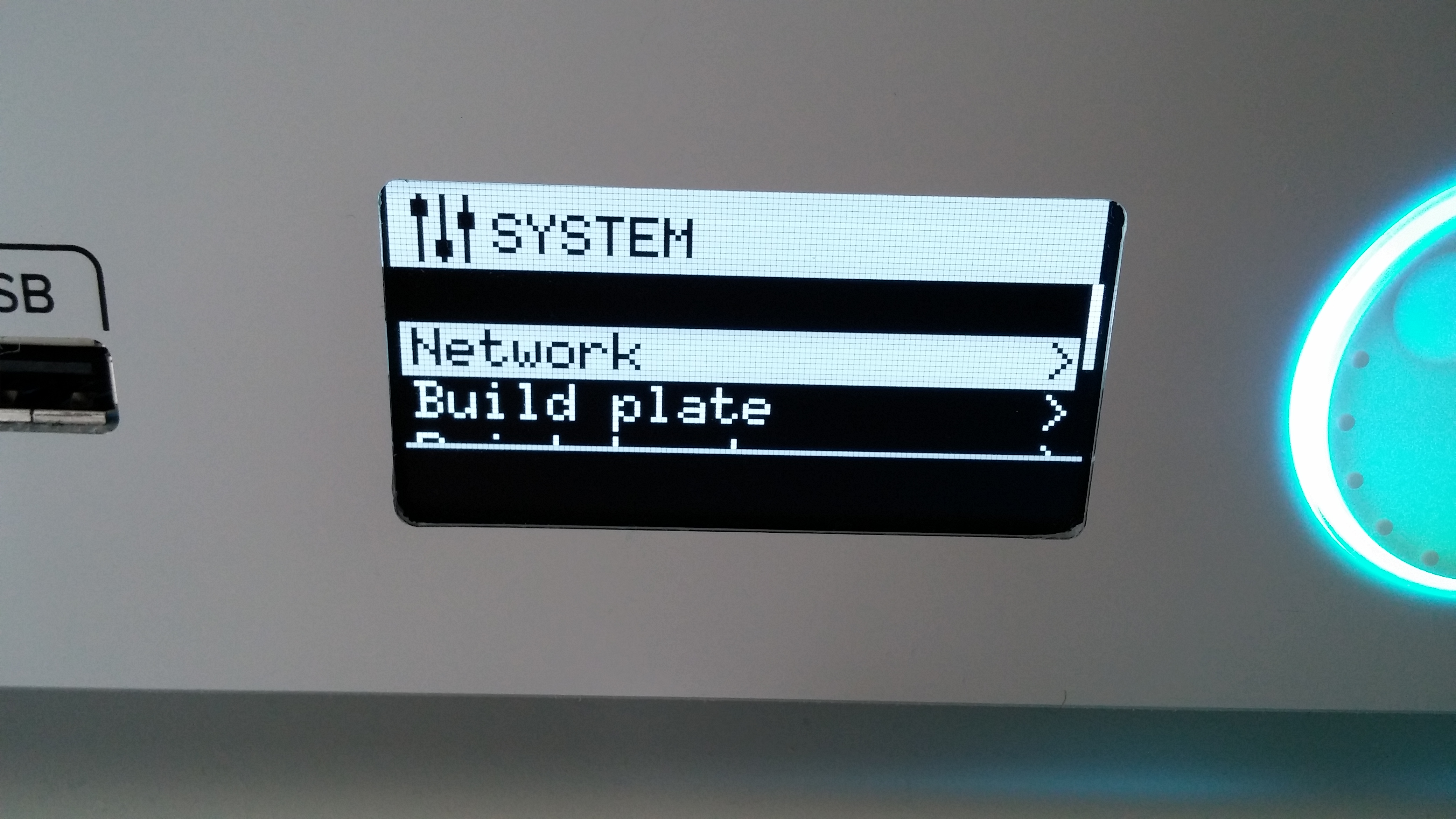
<p>Now open the “Network” menu:<figure id="attachment_4114" style="width: 300px" class="wp-caption aligncenter"></figure></p>

<p><a href="http://www.streamhead.com/wp-content/uploads/2017/11/UM3_system_menu.jpg"><img class="size-medium wp-image-4114" src="http://www.streamhead.com/wp-content/uploads/2017/11/UM3_system_menu-300x169.jpg" alt="" width="300" height="169" srcset="http://www.streamhead.com/wp-content/uploads/2017/11/UM3_system_menu-300x169.jpg 300w, http://www.streamhead.com/wp-content/uploads/2017/11/UM3_system_menu-768x432.jpg 768w, http://www.streamhead.com/wp-content/uploads/2017/11/UM3_system_menu-1024x576.jpg 1024w" sizes="(max-width: 300px) 100vw, 300px" /></a>&lt;figcaption class="wp-caption-text"&gt;Ultimaker 3 system menu with Network option selected.&lt;/figcaption&gt;&lt;/figure&gt;</p>

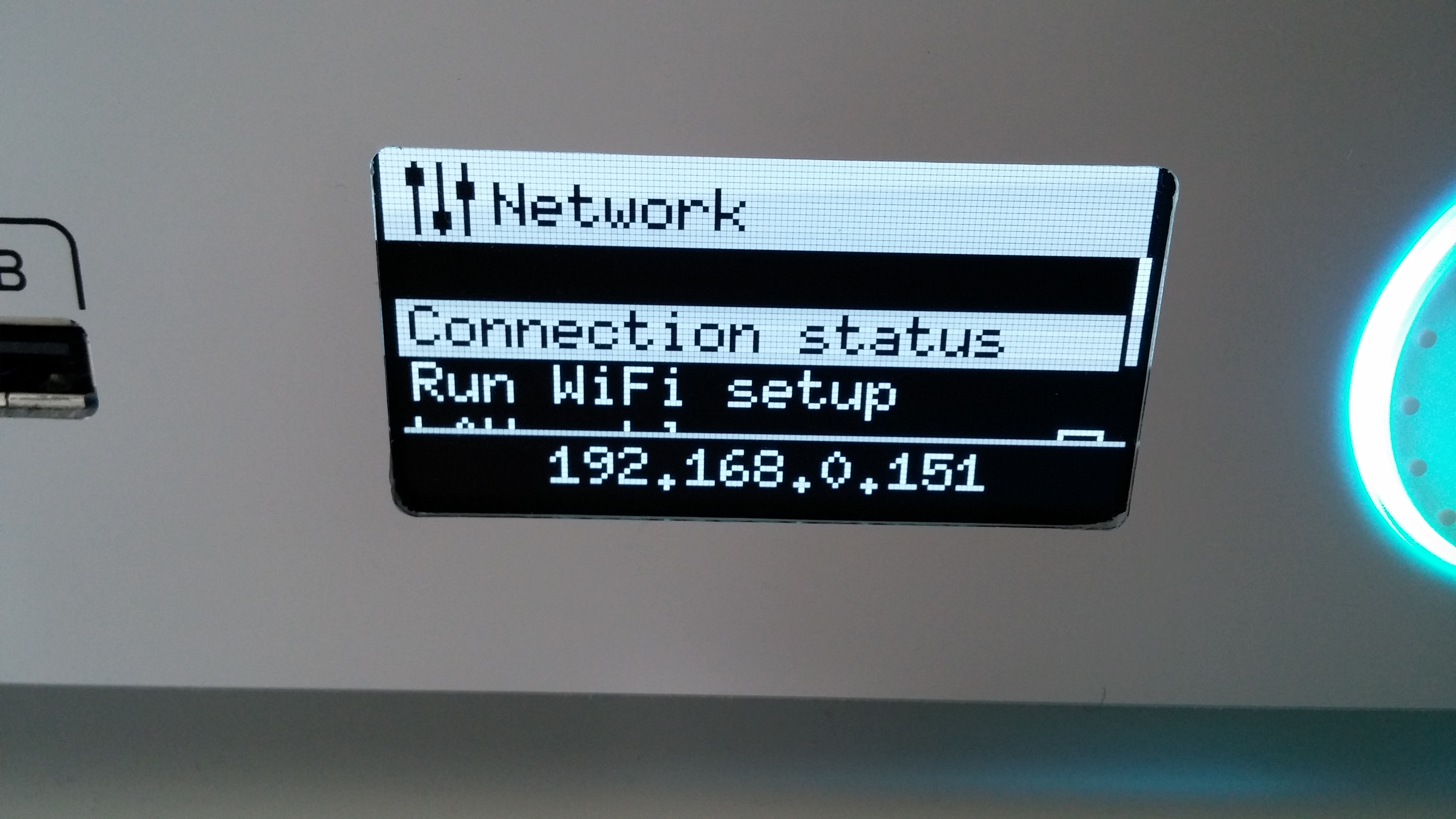
<p>Finally select the “Connection Status” option and the IP address will show at the bottom of the screen.<figure id="attachment_4115" style="width: 300px" class="wp-caption aligncenter"></figure></p>

<p><a href="http://www.streamhead.com/wp-content/uploads/2017/11/UM3_connection_status.jpg"><img class="size-medium wp-image-4115" src="http://www.streamhead.com/wp-content/uploads/2017/11/UM3_connection_status-300x169.jpg" alt="" width="300" height="169" srcset="http://www.streamhead.com/wp-content/uploads/2017/11/UM3_connection_status-300x169.jpg 300w, http://www.streamhead.com/wp-content/uploads/2017/11/UM3_connection_status-768x432.jpg 768w, http://www.streamhead.com/wp-content/uploads/2017/11/UM3_connection_status-1024x576.jpg 1024w" sizes="(max-width: 300px) 100vw, 300px" /></a>&lt;figcaption class="wp-caption-text"&gt;Ultimaker 3 connection status, showing the IP address of the printer.&lt;/figcaption&gt;&lt;/figure&gt;</p>

<p>Now you can construct the URL of the broadcast or stream. It looks like this:</p>

<pre>http://&lt;YOUR IP ADDRESS HERE&gt;:8080/?action=stream</pre>

<p>So in my case that would be <em>http://192.168.0.151:8080/?action=stream</em>. In your case, the IP address will be different, so the stream URL will also be slightly different.</p>

<p>You can open this URL in your browser to verify that it is correct. You should see the image of the webcam.</p>

<h2 id="recording-the-broadcast">Recording the Broadcast</h2>

<p>There are many ways to record the video stream of your webcam. They can be simple or they can be complicated.</p>

<p>If you are not very technical, I would suggest you get yourself <a href="https://www.videolan.org/vlc/">VLC Media Player</a>. It’s free and it works on almost any system.</p>

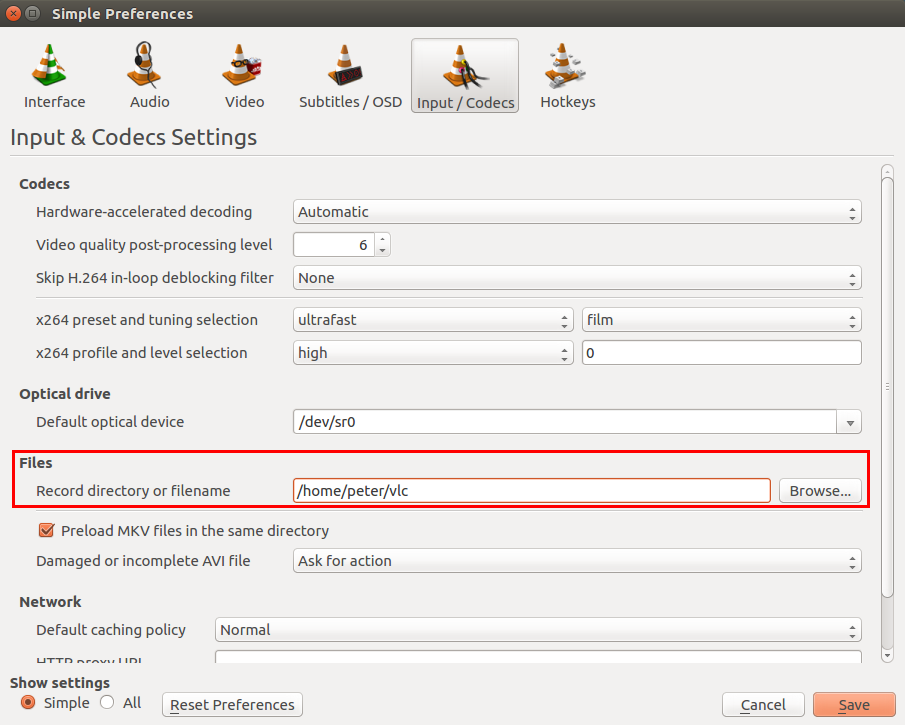
<p>Before you start, you will want to configure the folder where the recordings are stored:</p>

<ul>
  <li>In the menu go to Tools &gt; Preferences &gt; Input/Codecs</li>
  <li>Enter your folder in  Files &gt; Record directory or filename<figure id="attachment_4110" style="width: 300px" class="wp-caption aligncenter"></figure></li>
</ul>

<p><a href="http://www.streamhead.com/wp-content/uploads/2017/11/vlc_configure_record_directory.png"><img class="size-medium wp-image-4110" src="http://www.streamhead.com/wp-content/uploads/2017/11/vlc_configure_record_directory-300x240.png" alt="" width="300" height="240" srcset="http://www.streamhead.com/wp-content/uploads/2017/11/vlc_configure_record_directory-300x240.png 300w, http://www.streamhead.com/wp-content/uploads/2017/11/vlc_configure_record_directory-768x615.png 768w, http://www.streamhead.com/wp-content/uploads/2017/11/vlc_configure_record_directory.png 905w" sizes="(max-width: 300px) 100vw, 300px" /></a>&lt;figcaption class="wp-caption-text"&gt;Configure the folder where VLC will store recordings.&lt;/figcaption&gt;&lt;/figure&gt;</p>

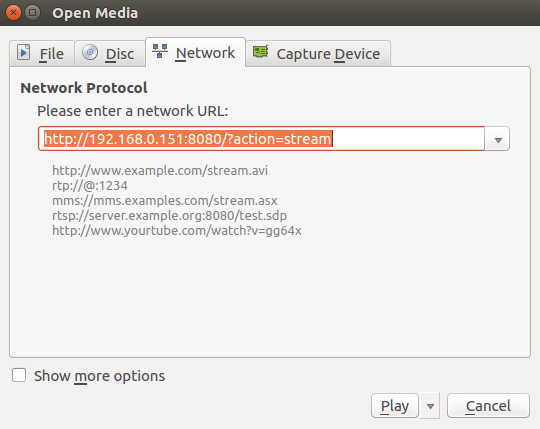
<p>To record your stream, first open it by going to the “Media” menu item and choose “Open Network Stream…”<figure id="attachment_4111" style="width: 300px" class="wp-caption aligncenter"></figure></p>

<p><a href="http://www.streamhead.com/wp-content/uploads/2017/11/vlc_open_stream.png"><img class="size-medium wp-image-4111" src="http://www.streamhead.com/wp-content/uploads/2017/11/vlc_open_stream-300x238.png" alt="" width="300" height="238" srcset="http://www.streamhead.com/wp-content/uploads/2017/11/vlc_open_stream-300x238.png 300w, http://www.streamhead.com/wp-content/uploads/2017/11/vlc_open_stream.png 540w" sizes="(max-width: 300px) 100vw, 300px" /></a>&lt;figcaption class="wp-caption-text"&gt;Open a network stream in VLC&lt;/figcaption&gt;&lt;/figure&gt;</p>

<p>Next, record the stream by picking the “Record” option from the “Playback” menu.</p>

<p>To stop the recording, click the record option again.</p>

<p>That’s all there is to it. You can now go into the folder you selected and rewatch the print.</p>

<p>Don’t forget to check out <a href="http://www.streamhead.com/category/3d-printing/">my other 3D printing articles</a>, where you can learn to fix the most annoying problem with 3D prints: <a href="http://www.streamhead.com/make-3d-printed-parts-fit-together/">making them fit properly</a>.</p>

<p>(<a href="https://www.flickr.com/photos/tysonluneau/4603211518/in/photostream/">image credit</a>)</p>

<!-- AddThis Advanced Settings generic via filter on the_content -->

<!-- AddThis Share Buttons generic via filter on the_content -->]]></content><author><name>Peter Backx</name></author><category term="3D Printing" /><summary type="html"><![CDATA[So you’ve got this awesome Ultimaker 3 printer with a build-in webcam. But no way to record and review your prints later on. Are you going to sit around, babysitting your printer at night?]]></summary><media:thumbnail xmlns:media="http://search.yahoo.com/mrss/" url="https://www.streamhead.com/wp-content/uploads/2017/11/4603211518_49a80588cc_z-640x372.jpg" /><media:content medium="image" url="https://www.streamhead.com/wp-content/uploads/2017/11/4603211518_49a80588cc_z-640x372.jpg" xmlns:media="http://search.yahoo.com/mrss/" /></entry><entry><title type="html">How to Make 3D Printed Parts Fit Together</title><link href="https://www.streamhead.com/make-3d-printed-parts-fit-together/" rel="alternate" type="text/html" title="How to Make 3D Printed Parts Fit Together" /><published>2017-02-11T11:08:07+01:00</published><updated>2017-02-11T11:08:07+01:00</updated><id>https://www.streamhead.com/make-3d-printed-parts-fit-together</id><content type="html" xml:base="https://www.streamhead.com/make-3d-printed-parts-fit-together/"><![CDATA[<p>One of the great things about 3D printing is that you can print an entire model in one go. The typical example is the fully assembled “print-in-place” ball bearing as shown in the image above. This is printed in one go, no assembly required. However, the tolerances are pretty small which requires a well-tuned 3D printer. In this article, I describe how I tune my machine for perfect fit.</p>

<!--more-->

<p>Because layers of a 3D printed object are never perfectly aligned, you need a bit of a margin between parts that should touch. If you don’t, the two parts will fuse together.</p>

<p>There are test objects that you can print to help you figure out what margins you need. I printed <a href="http://www.instructables.com/id/Objet-3D-Printer-Fit-Tests/">this test</a> and it turns out, the parts didn’t even fit at the largest margin.</p>

<p>Clearly something was wrong with my settings.</p>

<p>And thus began a frustrating experience of figuring out how to exactly align all the different factors that influence a perfectly printed part.</p>

<p>The <strong>three factors</strong> you need to take into account are:</p>

<ul>
  <li><strong>E-steps</strong>, or how fast your extruder will push filament through the nozzle.</li>
  <li>The extrusion size, which is the <strong>layer height</strong> and <strong>extrusion width</strong> of the extruded filament.</li>
  <li>The <strong>extrusion multiplier</strong>, which allows you to tweak the amount of filament extruder per type of filament.</li>
</ul>

<h2 id="calibrate-e-steps">Calibrate E-steps</h2>

<p>This is the most important thing to you can do to improve your prints. You need to tune the extruder steps setting to perfection. I’ve already mentioned those in <a href="http://www.streamhead.com/so-ive-build-a-3d-printer-now-what-make-2/">my previous article</a>, but I’m going to repeat those two videos, these are exactly what you need:</p>

<p>[embedyt]https://www.youtube.com/watch?v=w_Wb0i0-Qvo[/embedyt]</p>

<p>[embedyt]https://www.youtube.com/watch?v=cnjE5udkNEA[/embedyt]</p>

<p><a href="https://github.com/ahmetcemturan/SFACT/blob/master/calibration/_40x10.STL">This is the model you need</a>.</p>

<h2 id="extrusion-width-and-layer-height">Extrusion Width and Layer Height</h2>

<p>In your slicer, you can configure the extrusion width and layer height.</p>

<p><strong>Your layer height should stay well below your nozzle diameter</strong>. If you have a 0.4mm nozzle, a layer height of 0.2mm is fine. 0.1mm will work too, but your prints will take double the time.</p>

<p>Most slicers, such as Slic3r will, by default, automatically calculate an extrusion width value that they consider “good” for your nozzle diameter.</p>

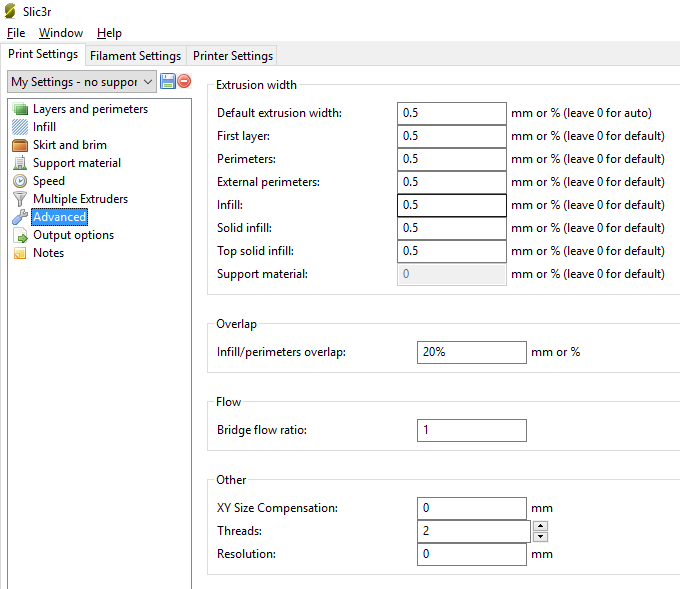
<p><strong>In general you want the extrusion width to be wider than the diameter of your nozzle</strong>. So if you have a 0.4mm diameter nozzle, go for 0.5mm width. If you go below that, chances are there will be some overextrusion which will almost certainly make parts not fit (most importantly, you’ll get too small holes in your prints)<figure id="attachment_3957" style="width: 680px" class="wp-caption aligncenter"></figure></p>

<p><img class="size-full wp-image-3957" src="http://www.streamhead.com/wp-content/uploads/2017/02/slic3r_advanced_settings_for_4_nozzle.png" alt="" width="680" height="589" srcset="http://www.streamhead.com/wp-content/uploads/2017/02/slic3r_advanced_settings_for_4_nozzle.png 680w, http://www.streamhead.com/wp-content/uploads/2017/02/slic3r_advanced_settings_for_4_nozzle-300x260.png 300w" sizes="(max-width: 680px) 100vw, 680px" />&lt;figcaption class="wp-caption-text"&gt;I decided to go for 0.5mm extrusion width for everything. Some articles suggest decreasing the perimeter width, but going below 0.5mm only made things worse on my printer.&lt;/figcaption&gt;&lt;/figure&gt;</p>

<p>Many tutorials on fit calibration will tell you to decrease the extrusion width of the perimeters. This is good advice, as long as you don’t go below your nozzle’s diameter.</p>

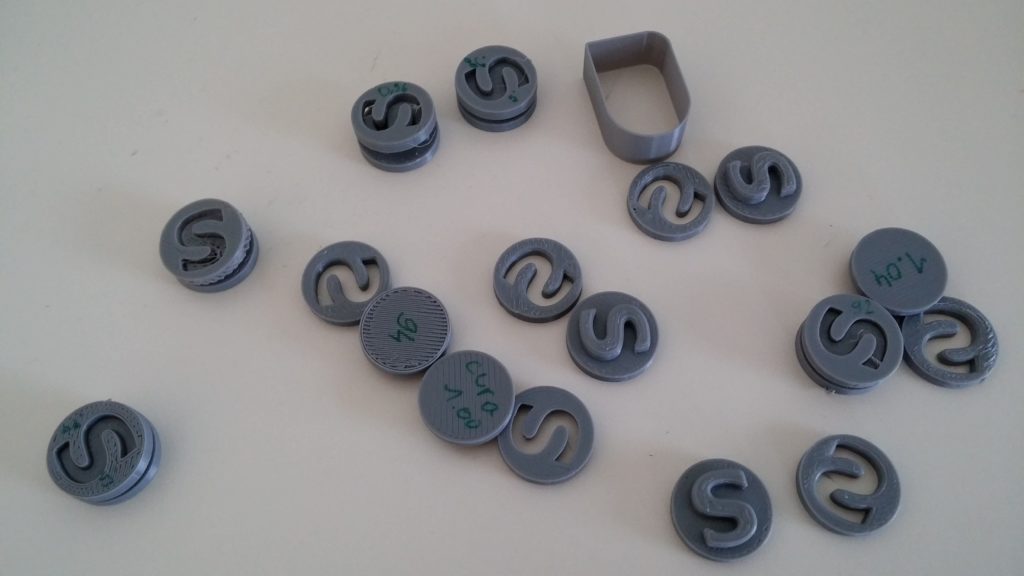
<p><img class="aligncenter size-large wp-image-3952" src="http://www.streamhead.com/wp-content/uploads/2017/02/s-plugs-1024x576.jpg" alt="A bunch of calibration test prints" width="474" height="267" srcset="http://www.streamhead.com/wp-content/uploads/2017/02/s-plugs-1024x576.jpg 1024w, http://www.streamhead.com/wp-content/uploads/2017/02/s-plugs-300x169.jpg 300w, http://www.streamhead.com/wp-content/uploads/2017/02/s-plugs-768x432.jpg 768w" sizes="(max-width: 474px) 100vw, 474px" /></p>

<h2 id="extrusion-multiplier">Extrusion Multiplier</h2>

<p>With all of that out of the way, it’s time to start printing calibration pieces and fine tune the extrusion multiplier until the result is what you want.</p>

<p><a href="http://www.thingiverse.com/thing:342198">I like this S-plug design because it is a quick print, unlike some other calibration objects</a>.</p>

<p>Start by printing it with your current settings and check that:</p>

<ul>
  <li>The bottom and top layers are filled, but are not bulging.</li>
  <li>The pieces fit. You should need a bit of force to push them together.</li>
  <li>Layers are not separated</li>
</ul>

<p>Probably your first test is not going to be right. This is where tuning the extrusion multiplier comes into play.</p>

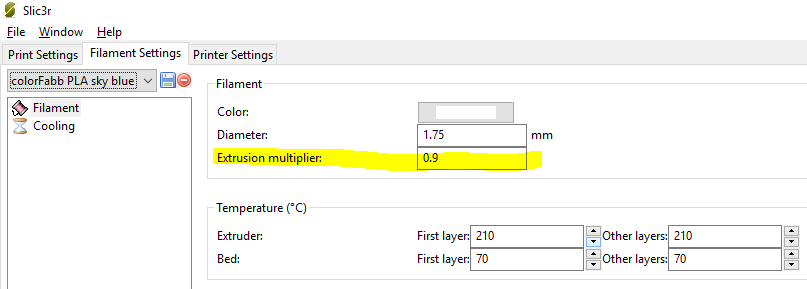
<p>Go to the filament settings in your slicer program and change the <strong>extrusion multiplier: increase it if you the fit is too loose or decrease it if you were not able to push the parts together.</strong><figure id="attachment_3958" style="width: 807px" class="wp-caption aligncenter"></figure></p>

<p><img class="size-full wp-image-3958" src="http://www.streamhead.com/wp-content/uploads/2017/02/slic3r_filament_settings.png" alt="" width="807" height="289" srcset="http://www.streamhead.com/wp-content/uploads/2017/02/slic3r_filament_settings.png 807w, http://www.streamhead.com/wp-content/uploads/2017/02/slic3r_filament_settings-300x107.png 300w, http://www.streamhead.com/wp-content/uploads/2017/02/slic3r_filament_settings-768x275.png 768w" sizes="(max-width: 807px) 100vw, 807px" />&lt;figcaption class="wp-caption-text"&gt;The ColorFabb filament uses an extrusion multiplier of 0.9 which is at the low end. This is because I did most the tuning with a cheap filament that was not 1.75mm but a bit less. I probably should redo my E-steps tuning.&lt;/figcaption&gt;&lt;/figure&gt;</p>

<h2 id="result">Result</h2>

<p>You are now able to print all of those cool objects with joints and bearings that always used to fuse together. Awesome!</p>

<p>From now on, every time you want to start using a new roll of filament, you print a few S plugs and adjust the extrusion multiplier for that filament. That will ensure perfect fit.</p>

<p><a href="http://www.thingiverse.com/thing:1230075">This is a cool test object if you’re looking for something to try</a>.</p>

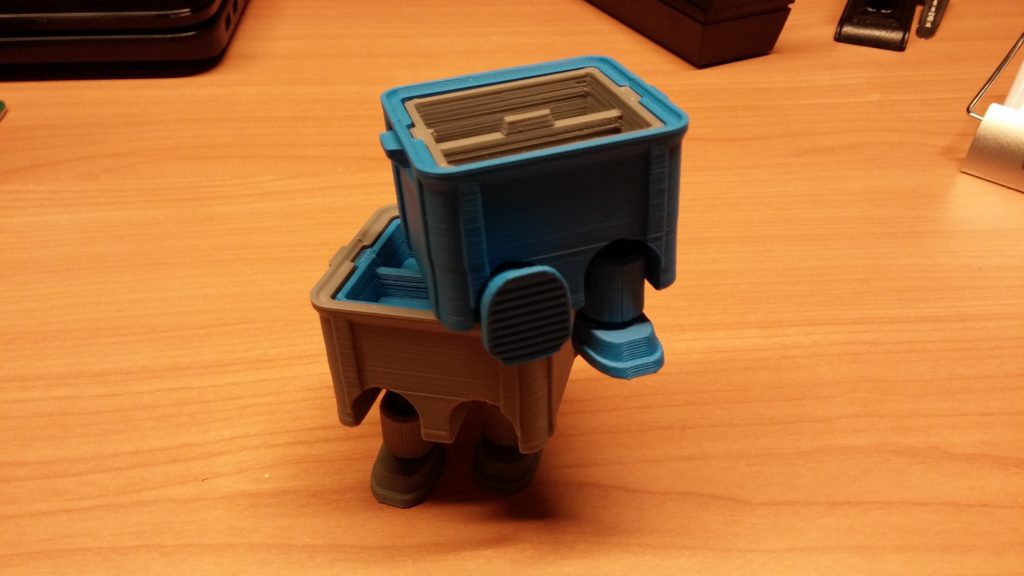
<p><img class="aligncenter size-large wp-image-3953" src="http://www.streamhead.com/wp-content/uploads/2017/02/stackable_box_toy-1024x576.jpg" alt="A crossing between a robot and a box" width="474" height="267" srcset="http://www.streamhead.com/wp-content/uploads/2017/02/stackable_box_toy-1024x576.jpg 1024w, http://www.streamhead.com/wp-content/uploads/2017/02/stackable_box_toy-300x169.jpg 300w, http://www.streamhead.com/wp-content/uploads/2017/02/stackable_box_toy-768x432.jpg 768w" sizes="(max-width: 474px) 100vw, 474px" /></p>

<!-- AddThis Advanced Settings generic via filter on the_content -->

<!-- AddThis Share Buttons generic via filter on the_content -->]]></content><author><name>Peter Backx</name></author><category term="3D Printing" /><summary type="html"><![CDATA[One of the great things about 3D printing is that you can print an entire model in one go. The typical example is the fully assembled “print-in-place” ball bearing as shown in the image above. This is printed in one go, no assembly required. However, the tolerances are pretty small which requires a well-tuned 3D printer. In this article, I describe how I tune my machine for perfect fit.]]></summary><media:thumbnail xmlns:media="http://search.yahoo.com/mrss/" url="https://www.streamhead.com/wp-content/uploads/2017/01/print_in_place_ball_bearings-672x372.jpg" /><media:content medium="image" url="https://www.streamhead.com/wp-content/uploads/2017/01/print_in_place_ball_bearings-672x372.jpg" xmlns:media="http://search.yahoo.com/mrss/" /></entry><entry><title type="html">Goals for 2017 and a bit about 2016</title><link href="https://www.streamhead.com/2017/" rel="alternate" type="text/html" title="Goals for 2017 and a bit about 2016" /><published>2017-01-16T17:47:14+01:00</published><updated>2017-01-16T17:47:14+01:00</updated><id>https://www.streamhead.com/2017</id><content type="html" xml:base="https://www.streamhead.com/2017/"><![CDATA[<p>It’s that time of the year again. Time to look back and look forward.</p>

<!--more-->

<p>Previous years: <a href="http://www.streamhead.com/2015-is-over-welcome-2016/">2015</a>, <a href="http://www.streamhead.com/2014-review-2015-preview/">2014</a>, <a href="http://www.streamhead.com/2013-review-looking-forward-2014/">2013</a>, <a href="http://www.streamhead.com/year-review-2012-goals-2013/">2012</a>, <a href="http://www.streamhead.com/review-and-preview-2012/">2011</a>, <a href="http://www.streamhead.com/streamhead-in-2011/">2010</a>.</p>

<h2 id="2016">2016</h2>

<p>So what happened last year:</p>

<ul>
  <li>We finally moved! Building a new house was a huge and stressful project that took way longer than expected. It’s good to have this (mostly) of our plate.</li>
  <li>I got some “<a href="http://www.streamhead.com/tag/maker-challenge/">makes</a>” done and documented. As usual, a lot less than I would have liked, but it’s a start. I also have a bunch of unfinished ones which may re-appear next year.</li>
  <li>Most of my spare time was spend on my 3D printer. It was fun and 2017 should be the year I actually get something done with the printer (except printing toys, which I’ve done quite a bit of)</li>
  <li>I was able to do some cool stuff for my consulting client. Some highlights: Build a Spring Boot app from scratch and move Jenkins to AWS.</li>
  <li><a href="https://www.goodreads.com/user_challenges/4236567">I read 16 books, which was 4 shy of my 20 books goal</a>. I’m happy with the selection I read. I could have gamed the system by reading shorter books, but I’m glad I didn’t.</li>
</ul>

<p><a href="http://www.streamhead.com/wp-content/uploads/2017/01/6a00d8341bf7f753ef013487f89c58970c.jpg"><img class="aligncenter size-full wp-image-3942" src="http://www.streamhead.com/wp-content/uploads/2017/01/6a00d8341bf7f753ef013487f89c58970c.jpg" alt="USS enterprise" width="500" height="326" srcset="http://www.streamhead.com/wp-content/uploads/2017/01/6a00d8341bf7f753ef013487f89c58970c.jpg 500w, http://www.streamhead.com/wp-content/uploads/2017/01/6a00d8341bf7f753ef013487f89c58970c-300x196.jpg 300w" sizes="(max-width: 500px) 100vw, 500px" /></a></p>

<h2 id="2017">2017</h2>

<p>So what’s up for 2017? I have some general targets of things I’d like to do, but knowing how things go, I may end up going in a completely different direction anyway:</p>

<ul>
  <li>I want to print something that also involves my passion for electronics. I’m currently thinking of a quadcopter or a robot, but nothing has been decided yet.</li>
  <li>I have signed up for Udacity’s AI nanodegree. Last year I started Coursera’s 3D Printing specialization, which was really cool until they stopped producing the course halfway through (without any explanation). I hope things go better with this one. In any case, I want to apply AI and deep learning principles in practice. Maybe by joining a competition on Kaggle.</li>
  <li>I started rewatching  Star Trek the Next Generation. This year will be the 20th anniversay of the airing of the first episode.</li>
  <li>I’d like to reread the first 6 Dune novels I read a long time ago and tackle on a few of the new books (the ones not by Frank Herbert). Given my reading speed and the fact that I want to read other books, this is not going to be done this year.</li>
</ul>

<p>So … lets get going!</p>

<p> </p>

<!-- AddThis Advanced Settings generic via filter on the_content -->

<!-- AddThis Share Buttons generic via filter on the_content -->]]></content><author><name>Peter Backx</name></author><category term="On Streamhead" /><summary type="html"><![CDATA[It’s that time of the year again. Time to look back and look forward.]]></summary><media:thumbnail xmlns:media="http://search.yahoo.com/mrss/" url="https://www.streamhead.com/wp-content/uploads/2017/01/spacex-icarus-670-670x372.jpg" /><media:content medium="image" url="https://www.streamhead.com/wp-content/uploads/2017/01/spacex-icarus-670-670x372.jpg" xmlns:media="http://search.yahoo.com/mrss/" /></entry><entry><title type="html">Make: Paper Inventions Review (make #5)</title><link href="https://www.streamhead.com/make-paper-inventions-review-make-5/" rel="alternate" type="text/html" title="Make: Paper Inventions Review (make #5)" /><published>2016-09-20T22:22:49+02:00</published><updated>2016-09-20T22:22:49+02:00</updated><id>https://www.streamhead.com/make-paper-inventions-review-make-5</id><content type="html" xml:base="https://www.streamhead.com/make-paper-inventions-review-make-5/"><![CDATA[<p><a href="http://amzn.to/2crUrb6">Make: Paper Inventions</a> is a book about things you can do with paper. This is a very practical book with projects going from actually making paper, to paper machines and even a bit of origami. It took me over 10 months to get through this book. Read on to find out why.</p>

<!--more-->

<p>I started reading <a href="http://amzn.to/2crUrb6">Make: Paper Inventions</a> somewhere in the Fall of 2015. I figured I would quickly go through it, select a few projects that I wanted to make and be done with it in maybe a month or so.</p>

<p>Things went a little different. Lets start with an overview of the projects I did.</p>

<h2 id="paper-electronics">Paper Electronics</h2>

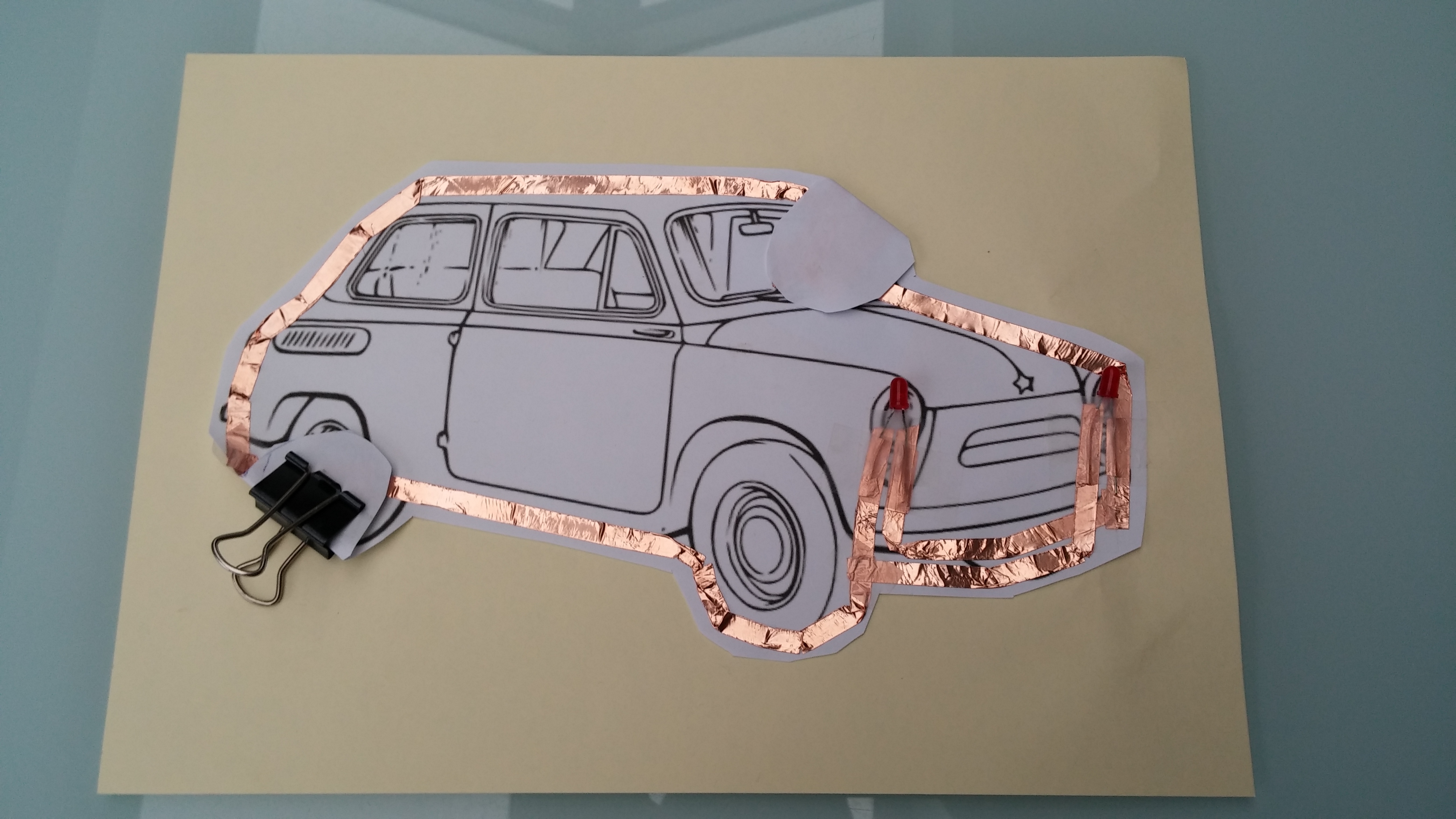
<p>The book has a great idea of combining paper with conductive tape, LEDS and a small cell battery. This is a solid idea and the possibilities are endless.</p>

<p>My son choose the first thing to make: a car with headlights. In this version we choose to make the conductive tape visible.<figure id="attachment_3907" style="width: 474px" class="wp-caption aligncenter"></figure></p>

<p><a href="http://www.streamhead.com/wp-content/uploads/2016/09/20151129_092708.jpg"><img class="size-large wp-image-3907" src="http://www.streamhead.com/wp-content/uploads/2016/09/20151129_092708-1024x576.jpg" alt="Car on paper with bronze conductive tape around it." width="474" height="267" srcset="http://www.streamhead.com/wp-content/uploads/2016/09/20151129_092708-1024x576.jpg 1024w, http://www.streamhead.com/wp-content/uploads/2016/09/20151129_092708-300x169.jpg 300w, http://www.streamhead.com/wp-content/uploads/2016/09/20151129_092708-768x432.jpg 768w" sizes="(max-width: 474px) 100vw, 474px" /></a>&lt;figcaption class="wp-caption-text"&gt;The lights light up when you press the round thing that represents the steering wheel (some imagination required)&lt;/figcaption&gt;&lt;/figure&gt;</p>

<p>I searched around but could not located a local supplier for the conductive tape. Eventually I ordered everything  from AliExpress. For about $10 you have supplies for many many projects.</p>

<p>Which brings us to the second design: it was Christmas time, so we made something seasonal. This time, I put the tape on the back side of the paper:<figure id="attachment_3908" style="width: 474px" class="wp-caption aligncenter"></figure></p>

<p><a href="http://www.streamhead.com/wp-content/uploads/2016/09/20151224_131658.jpg"><img class="size-large wp-image-3908" src="http://www.streamhead.com/wp-content/uploads/2016/09/20151224_131658-1024x576.jpg" alt="Christmas tree with LED lights" width="474" height="267" srcset="http://www.streamhead.com/wp-content/uploads/2016/09/20151224_131658-1024x576.jpg 1024w, http://www.streamhead.com/wp-content/uploads/2016/09/20151224_131658-300x169.jpg 300w, http://www.streamhead.com/wp-content/uploads/2016/09/20151224_131658-768x432.jpg 768w" sizes="(max-width: 474px) 100vw, 474px" /></a>&lt;figcaption class="wp-caption-text"&gt;If you move your finger from left to right and back, the lights will blink.&lt;/figcaption&gt;&lt;/figure&gt;</p>

<p>These are great projects to do with a kid. No matter the age. They can choose the design and color it. Afterwards, you can add the lights.</p>

<p>And if this is too easy, there are a tone of idea out there to make it more complicated. <a href="https://www.google.be/?gws_rd=ssl#safe=off&amp;q=build+electronic+circuits+on+paper">Just Google</a>.</p>

<h2 id="geodesic-dome">Geodesic Dome</h2>

<p>Next, its paper structures. Since we don’t have a newspaper it took us some time to collect the required paper for this project. You need a lot.</p>

<p>The initial step is to create paper struts, which is pretty tedious work.</p>

<p>Afterwards, building the dome starts out easy, but about halfway through, you really need an extra set of hands. I’m sure happy none of that was video-taped.</p>

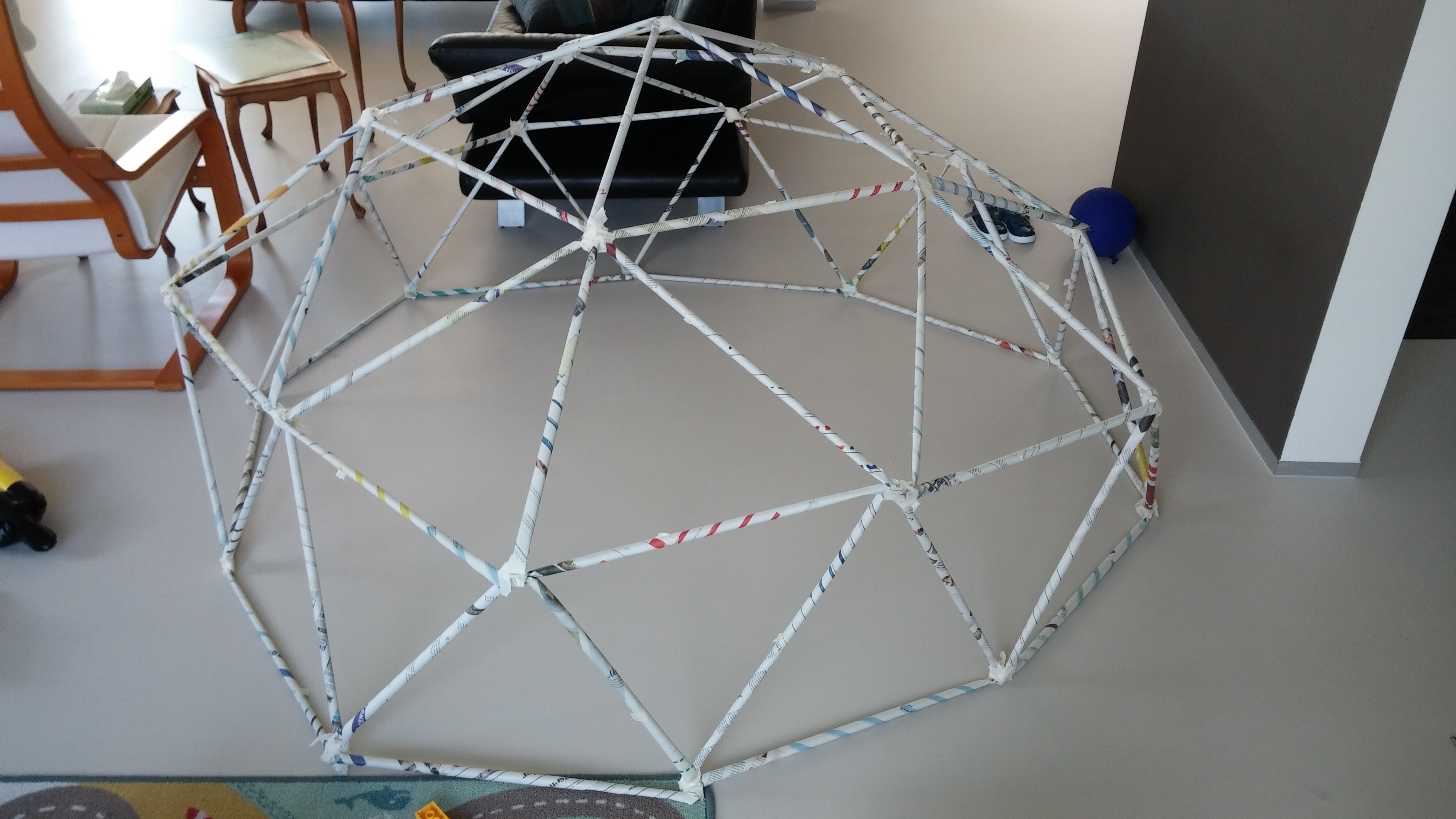
<p>The end result, though, was pretty cool and certainly larger than we expected:<figure id="attachment_3909" style="width: 474px" class="wp-caption aligncenter"></figure></p>

<p><a href="http://www.streamhead.com/wp-content/uploads/2016/09/20160702_115619.jpg"><img class="size-large wp-image-3909" src="http://www.streamhead.com/wp-content/uploads/2016/09/20160702_115619-1024x576.jpg" alt="A paper geodesic dome" width="474" height="267" srcset="http://www.streamhead.com/wp-content/uploads/2016/09/20160702_115619-1024x576.jpg 1024w, http://www.streamhead.com/wp-content/uploads/2016/09/20160702_115619-300x169.jpg 300w, http://www.streamhead.com/wp-content/uploads/2016/09/20160702_115619-768x432.jpg 768w" sizes="(max-width: 474px) 100vw, 474px" /></a>&lt;figcaption class="wp-caption-text"&gt;Although the structure is inherently very sturdy, the struts were a little too fragile. If I’d do it again, I would use extra paper (as is suggest in the book BTW)&lt;/figcaption&gt;&lt;/figure&gt;</p>

<p>Most of the construction work for this project was a bit too tedious for my 3 year old son. But he loved the end result. Just a pity we didn’t make it stronger (use double sheets for your struts!).</p>

<h2 id="paper-machines">Paper Machines</h2>

<p>This is the project where I spend a lot of time. A lot of time. I actually wanted to give up on this project, but eventually I did finish it. Sort of.</p>

<p>The chapter on paper machines describes how you can animate a Mars rover. It’s a great idea and it looks awesome, so I printed everything out and quickly figured out this was a major and seriously difficult project.</p>

<p>It requires a tremendous amount of attention to details to get this working properly. There are many small parts with almost no margin for error.</p>

<p>In a word: frustrating.</p>

<p>The parts for this project spend a lot of time in the cupboard, waiting to be completed. Eventually I gathered all my courage and ended up with this:<figure id="attachment_3911" style="width: 474px" class="wp-caption aligncenter"></figure></p>

<p><a href="http://www.streamhead.com/wp-content/uploads/2016/09/20160917_101014-e1474143243156.jpg"><img class="size-large wp-image-3911" src="http://www.streamhead.com/wp-content/uploads/2016/09/20160917_101014-e1474143243156-576x1024.jpg" alt="A paper Mars rover" width="474" height="843" srcset="http://www.streamhead.com/wp-content/uploads/2016/09/20160917_101014-e1474143243156-576x1024.jpg 576w, http://www.streamhead.com/wp-content/uploads/2016/09/20160917_101014-e1474143243156-169x300.jpg 169w, http://www.streamhead.com/wp-content/uploads/2016/09/20160917_101014-e1474143243156-768x1365.jpg 768w" sizes="(max-width: 474px) 100vw, 474px" /></a>&lt;figcaption class="wp-caption-text"&gt;When you turn the knob in the bottom right, the Mars rover is supposed to move and turn his head. It sort-of works, but it fails half of the time. It’s very brittle and certainly should not be operated by small children.&lt;/figcaption&gt;&lt;/figure&gt;</p>

<p>This project was, in my opinion, too difficult. I don’t know much about paper machines, but I think there should be something easier to get started. I’m sure, if you do get it working correctly, you will be very satisfied (you should be!)</p>

<h2 id="some-origami">Some Origami</h2>

<p>The final chapter of the book is on art. It shows a few ways to make artwork with paper. One being origami.</p>

<p>I’m not really an “art guy”, but I did enjoy origami in the past, so I folded the origami worm, which was a nice and relaxing project after the previous one:<figure id="attachment_3912" style="width: 474px" class="wp-caption aligncenter"></figure></p>

<p><a href="http://www.streamhead.com/wp-content/uploads/2016/09/20160917_100912.jpg"><img class="size-large wp-image-3912" src="http://www.streamhead.com/wp-content/uploads/2016/09/20160917_100912-1024x576.jpg" alt="An origami worm" width="474" height="267" srcset="http://www.streamhead.com/wp-content/uploads/2016/09/20160917_100912-1024x576.jpg 1024w, http://www.streamhead.com/wp-content/uploads/2016/09/20160917_100912-300x169.jpg 300w, http://www.streamhead.com/wp-content/uploads/2016/09/20160917_100912-768x432.jpg 768w" sizes="(max-width: 474px) 100vw, 474px" /></a>&lt;figcaption class="wp-caption-text"&gt;Because the book compared this to the very well known crane bird, I was expecting it to be a bit more interactive. It is not, but it’s a nice object anyway.&lt;/figcaption&gt;&lt;/figure&gt;</p>

<p>I’m not sure if this is the best origami project to choose, because the end result is a bit disappointing. But the folding itself is nice and it is neat to see it all come together.</p>

<h2 id="conclusion">Conclusion</h2>

<p><a href="http://amzn.to/2crUrb6">Make: Paper Inventions</a> contains a very wide range of paper projects that are going to keep you busy for a very long time. I only did about a third of the projects and it took me 10 months.</p>

<p>The book should be seen as an introduction: you get to sample all kinds of different things. By the end of the book, you’ll know what you like and what you want to do more of.</p>

<p>I personally really like the electronics and will most definitely do more of these.</p>

<p>If you even have a remote interest in paper, go get this book. It’s cheap and it will entertain you and your family for a long long time.</p>

<!-- AddThis Advanced Settings generic via filter on the_content -->

<!-- AddThis Share Buttons generic via filter on the_content -->]]></content><author><name>Peter Backx</name></author><category term="Making" /><category term="2016 Maker Challenge" /><summary type="html"><![CDATA[Make: Paper Inventions is a book about things you can do with paper. This is a very practical book with projects going from actually making paper, to paper machines and even a bit of origami. It took me over 10 months to get through this book. Read on to find out why.]]></summary><media:thumbnail xmlns:media="http://search.yahoo.com/mrss/" url="https://www.streamhead.com/wp-content/uploads/2016/09/Make_Paper_Inventions-672x372.jpg" /><media:content medium="image" url="https://www.streamhead.com/wp-content/uploads/2016/09/Make_Paper_Inventions-672x372.jpg" xmlns:media="http://search.yahoo.com/mrss/" /></entry></feed>