This post was originally send out to my newsletter subscribers. The newsletter documents all my updates and imrpovements to the Lego Sorting bot. It is an almost monthly newsletter (in practice, I send out about 6 newsletters per year). You can read previous editions here, or you can subscribe using the form below.
Hello LEGO enthusiasts,
Welcome to the latest update on my automated LEGO sorting machine! Although I took a slight detour from the original plan that I presented last month, I believe it’s setting up for some exciting results.
A
Quick Note: Hackathon Highlights
In other news, I spent most of my spare time this month entering the Valorant Devpost
Hackathon. If you’re curious, feel free to check out
the full code here.
Brickognize: Testing an AI-Based LEGO Brick Identifier
Many of you have asked about using Brickognize to identify LEGO bricks, and I finally took the plunge to see how it could work with my sorting machine. Here’s a quick look at what makes Brickognize appealing:
- No Deep Learning Training Required: Brickognize comes pre-trained, eliminating the need to develop a custom model.
- Wider Brick Recognition Range: Unlike my model, which identifies only three bricks for now, Brickognize can recognize all types.
- Simplified Image Management: No need to label and manage training images.
- Runs Without Expensive Hardware: Brickognize functions effectively without high-end equipment.
When combined with the Build HAT we discussed earlier, it offers a very compact, simple setup for LEGO recognition. However, Brickognize is entirely closed-source and reserves extensive rights to use any data you upload. Given that I already publish my data openly, I decided to go ahead and test it out.
Results of Testing Brickognize
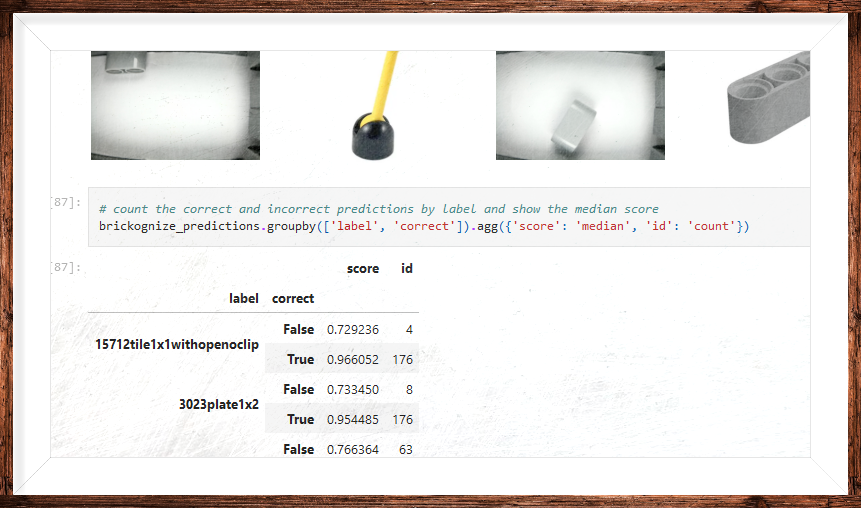
To gauge its effectiveness, I submitted my full set of LEGO brick images to Brickognize. Here’s what I found:
- Out of 581 images, 112 predictions were incorrect, or Brickognize returned no prediction.
- 37 images received no prediction at all.
- Prediction Confidence: Brickognize typically scored correct predictions around 0.95 and incorrect ones around 0.75. This difference could help segment uncertain results.
- Challenge Area: Brickognize struggled with “liftarm thick 1 x 2” when positioned sideways. Adjusting the camera angle could likely resolve this.
- Speed: Brickognize processed images quickly, a definite plus.
Overall, I’m pleased with the initial results. The next step is integrating Brickognize into the sorting machine software and testing it on a broader range of parts. You can find my detailed analysis on GitHub.
Raspberry Pi AI Camera: New Developments
Raspberry Pi has just released an AI camera, which combines camera functionality with an AI kit, albeit with slightly lower specs. Compatibility between this new camera and the current AI kit remains uncertain, so I’ll be sticking with my original kit for now.
Looking Ahead
By next month, I aim to share code for integrating Brickognize with the sorting machine, which should simplify the software aspect significantly.
Thanks for following along, and stay tuned for more updates!
Best,